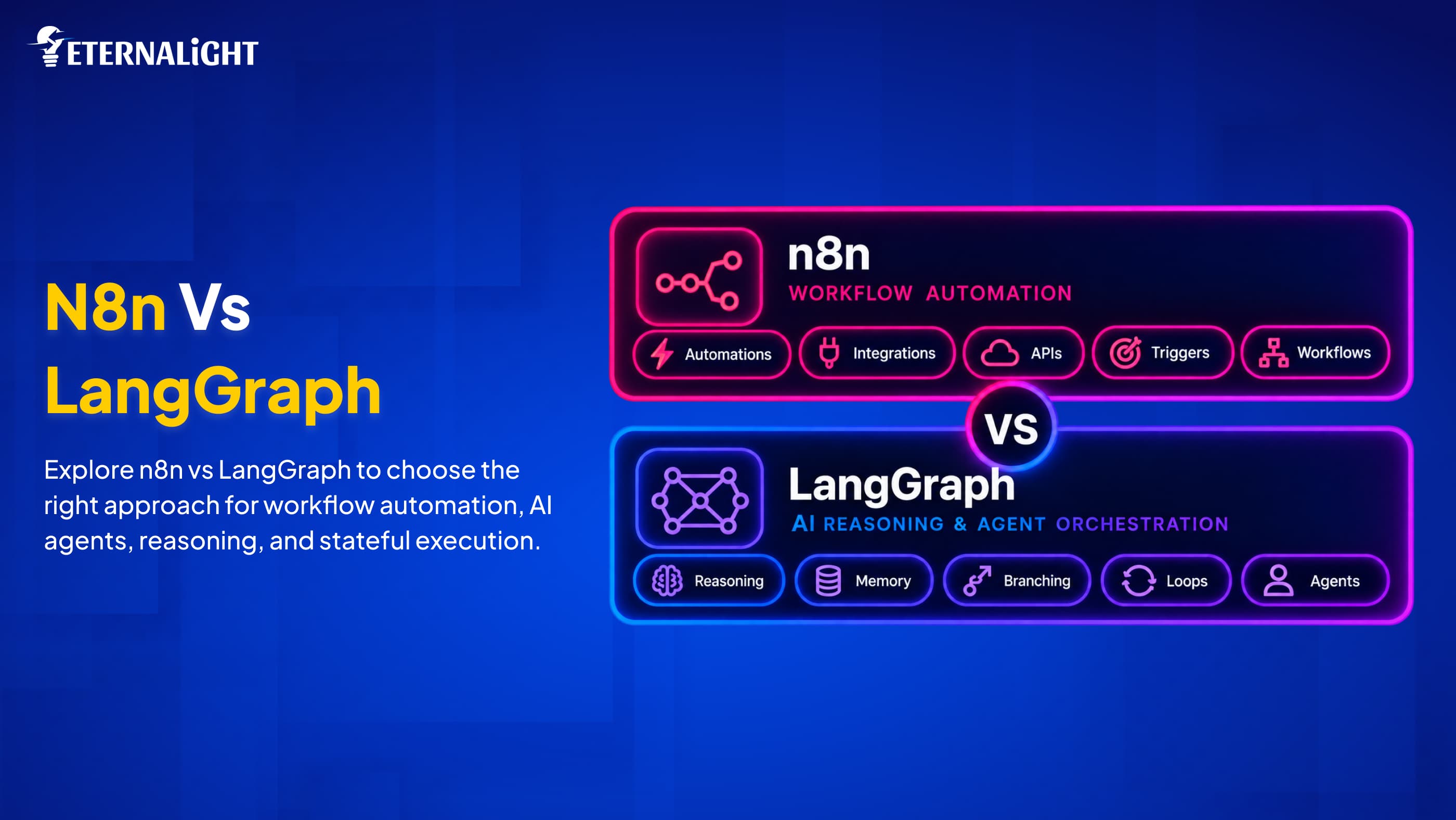
n8n and LangGraph are both trending for their exceptional capabilities to build AI workflows and AI agents. When we have multiple options in software development, confusion can set in, and that's true for both.
They seem similar, as they let us connect tools and models and drive efficiency and automation across multi-step workflows.
Sometimes developers praise n8n for making it easier to launch applications, APIs, and data pipelines. Sometimes LangGraph takes the lead over AI agent systems, enabling more powerful reasoning and state management to tackle complex multi-step execution.
All tools and frameworks work perfectly according to scenarios; instead of asking which is better between n8n and LangGraph, you should think of your AI project development use case and pick one.
If the project is all about data transmission, multi-step event triggers, and workflows, n8n is a good fit. If your priorities shift to building a dedicated stateful AI agent that involves memory, branching, calls, agent coordination, and loops, choosing LangGraph is a wise move.
Some projects need both exclusive agent logic and automated, uninterrupted workflow management; in those cases, the AI system works with both.
The blog covers the concept and perspective for both, along with the hurdles in the development world. It explains how they differ and why each makes sense: LangGraph vs n8n for building AI agents.
n8n: When the Workflow is the Product
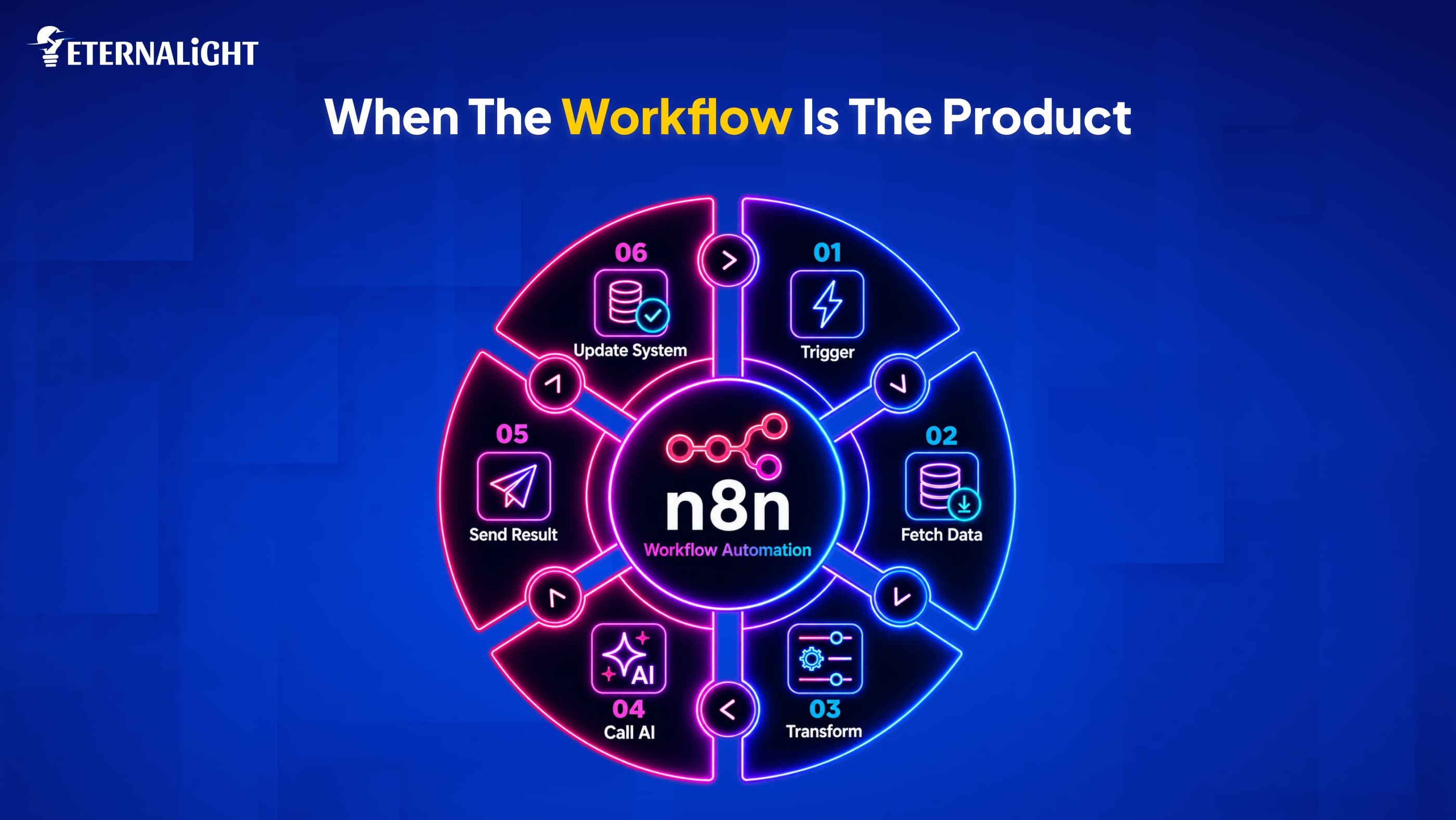
If we want to visualize the workflow with automation at its core, then n8n makes sense. It improves productivity through a node-based platform. It offers a sustainable use license to keep operations secure and compliant. When we implement n8n, it provides functions and code nodes for any organization or system. This allows managing event-driven flows, tasks, and orchestration across systems, integrating APIs and data pipelines.
Flow:
Trigger → Fetch data → Transform → Call AI → Send result → Update system
When we set up n8n with any tool or system, an event triggers, accesses inputs and information, processes the request, involves an AI agent, then generates the output and informs the system with updated information. This totally depends on accomplishing the process from pressing the button to enabling the system to respond to the event.
LangGraph: When the Reasoning is the Product
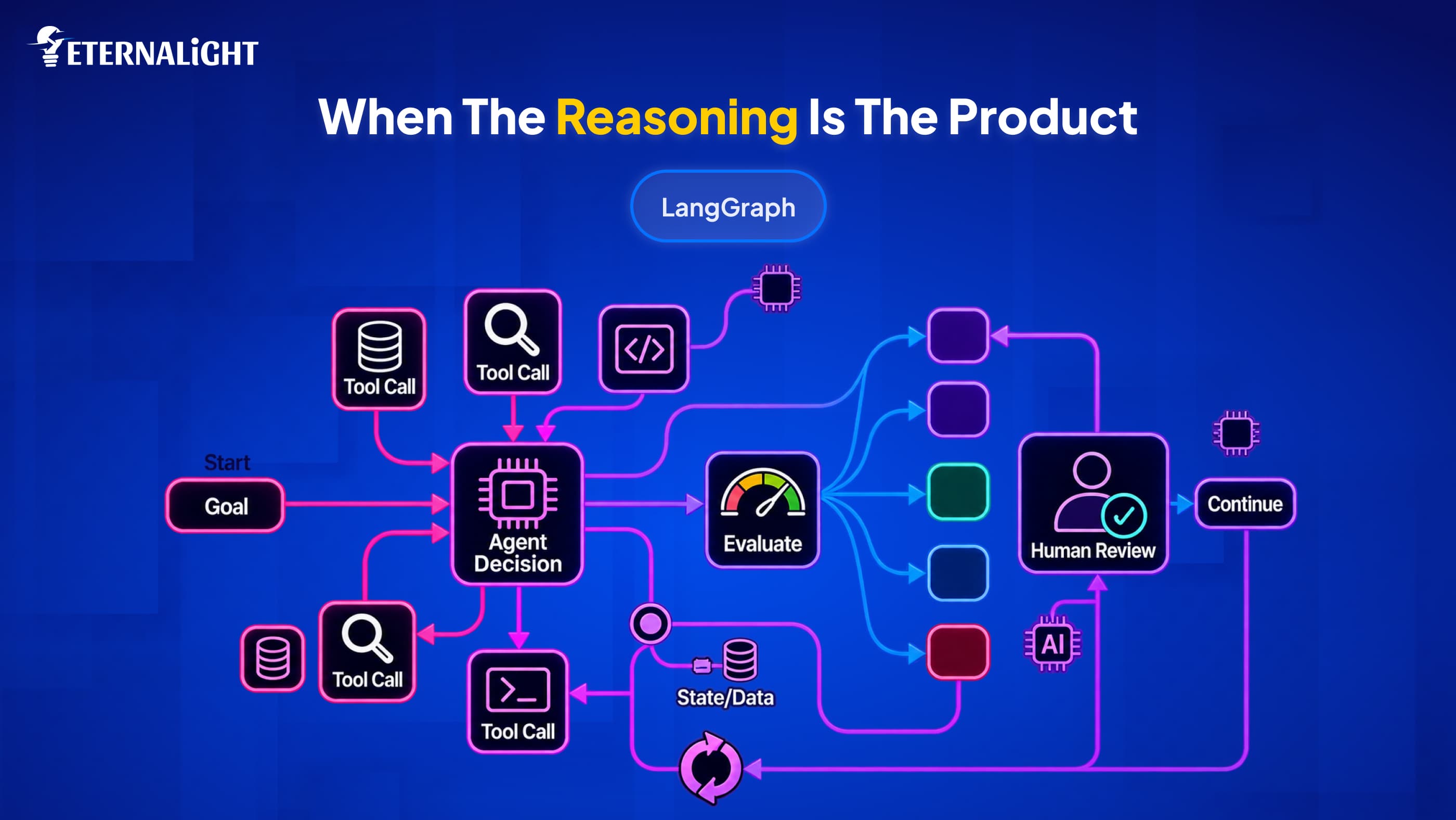
When the project includes multiple tasks, each with a dedicated AI agent, and you need to sync workflows and tasks with seamless collaboration, you can adopt LangGraph.
In n8n, nodes trigger events; in LangGraph, we need collaboration across different AI modules, each with separate memory and jobs. Each agent is directed to a task and moves on to another stage, forwarding the process. An agent can control the decision-making at every step, traversing multiple checkpoints.
Even with AI, agent governance is still needed to avoid mishaps and manage complex agentic workflows and branching pipelines; humans retain control, so that they can resume and recover from hazardous scenarios.
This graph representation helps you understand the process and the collaboration between AI agents, keeping humans at the center.
Flow:
Goal → Agent decides → Tool call → Evaluate result → Another step → Human review → Continue
Suppose the agent is assigned a shopping task; it will explore a suitable query match, call the integrated tool to make the purchase and pay, but still ask the human to confirm before completing the action.
Key Capabilities of LangGraph vs n8n
Working Experience:
n8n has an event-driven workflow with a start and end. The situation is arranged in loops or statements like if/switch, which we also call branching.
In LangGraph, each node has a graph-type representation when it is processed, resumed, or paused, depending on the condition.
Workflow
For n8n, the canvas documentation lets every team understand execution through diagrams without complexity.
In LangGraph, the editor depicts and visualizes everything through node functions, routing logic, and schemas. Later, developers can dive into production straightforwardly without wasting a single minute.
Human Intervention
Both tools enable human intervention in distinct ways: when n8n is integrated into an application, it waits for human validation and approval to complete the process through a wait node.
For example, if there is a form, a human can fill in the details, and then the AI agent can take charge of processing it. In n8n, sign-in and sign-off are standard whenever an event fires and AI agents and connected tools respond.
In LangGraph, multiple AI agents can participate in multiple jobs to accomplish the task; if any make an unnecessary move, a human can intervene mid-process. Agents can get confused about context or the task; once a human confirms the action, they can proceed.
Agentic AI and Integration Capability
If a project needs one or two agents set up with APIs, integrations, and tools, an n8n automation workflow works best, handling access control, pagination, databases, and messaging, and enabling users during debugging. It’s fast, low-cost, follows a linear process, uses a clear pattern, and moves smoothly.
For multi-agent orchestration, LangGraph owns the space with a unique layer to supervise multi-agents collecting their responses. It also verifies whether the work is in progress or completed.
Enabling developers to wrap multiple functions together. Whereas maintenance is a bit tough, as there are limits, schema upgrades, and authentication refreshes required for each service you opt for.
Real-time Monitoring
Whenever an incorrect node is connected, the dashboard flags the change. When the user sees the failure, they can make the necessary change and complete the process successfully.
LangGraph is developed with Python. This makes it easy to trace any failure on the dashboard. Developers can observe states and stdout logs, and connect LangSmith with LangGraph or any other tracer to check token cost as well.
Scalability
In n8n, the main process and secondary tasks are isolated. Heavy processes run through the self-hosted n8n interface, while secondary tasks are handled by workers using payloads and Redis workflows.
To scale any project in a LangGraph setup, team members need experience adding deployments as needed, and they must also know how to reduce fragmented data and confusion when managing the backend efficiently.
Security & Governance
n8n does exactly what users want: it hides credentials and keeps them out of reach of AI agents; it gives the tool and its connected AI agents only the necessary control through encryption, modern authorization & authentication practices, and tracking of every session and activity.
On the other hand, LangGraph is open-source, enabling one-time sign-on but without roles. Developers can set up the security posture according to their project choices with proper authorization.
Lock-in License
That's the major difference, which strongly influences your decision because n8n enables self-hosting for multiple apps, so that it can run internal business operations. LangGraph has a commercial MIT license to run applications in a cloud setup. Accessibility is not limited, but it is paid.
How to Make a Decision: n8n vs LangGraph?
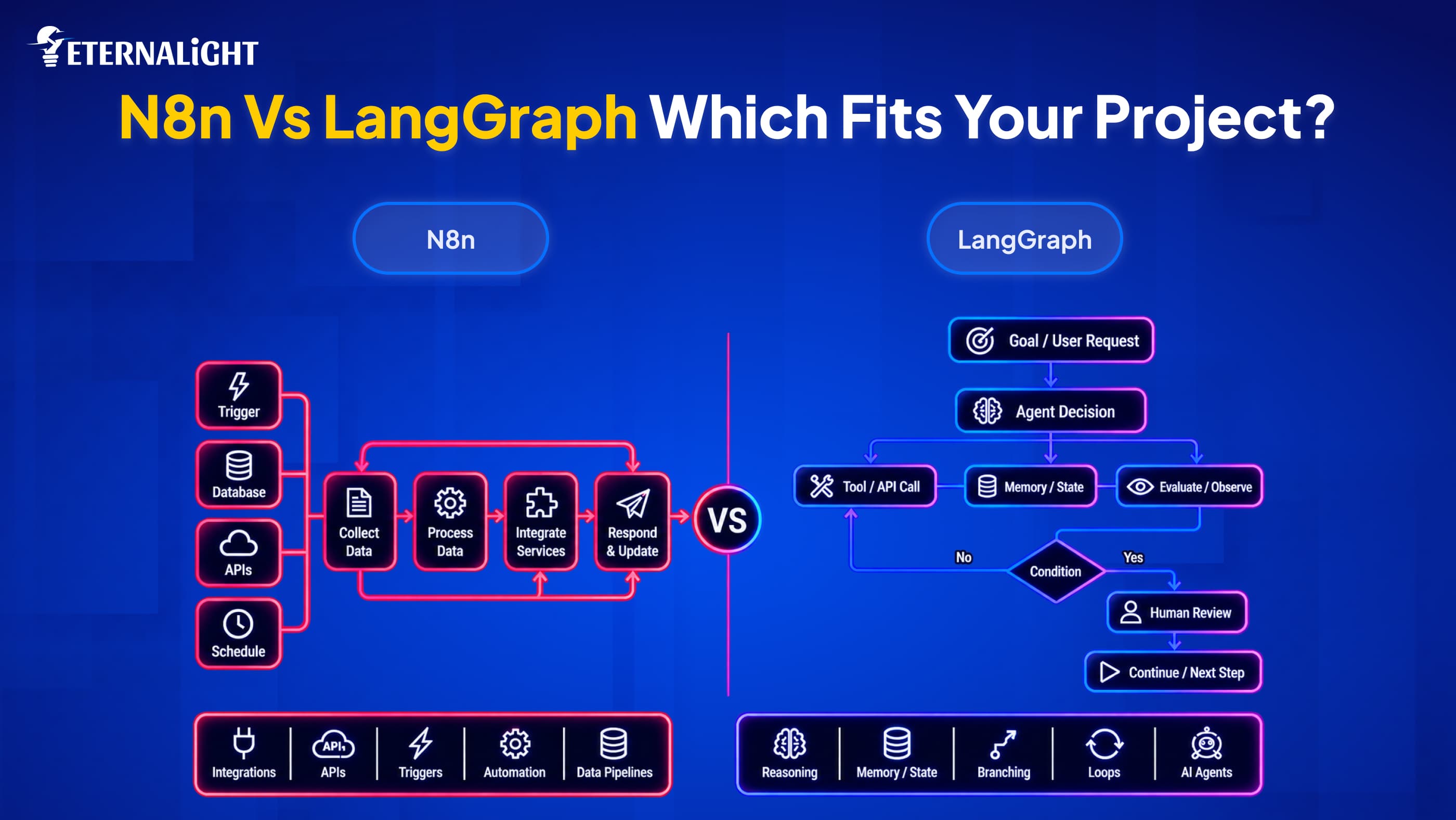
LangGraph and n8n both have unique strengths in real-world scenarios. n8n is a modest, fast option for app sync and workflow automation, but for some ground-level automation, you can choose LangGraph as well.
Finally, your team will integrate them into your organization, so they must be capable and comfortable tackling this and well aware of its functionality.
Don’t choose n8n if you want seamless collaboration among multi-agents with advanced reasoning and memory capabilities to store inputs.
Sometimes people fall for pricing that seems like a low investment, but what if it can’t fit your needs and fix the existing issue?
When choosing between n8n and LangGraph, focus on what your team needs to complete the project and scale it later.
Choose the platform that can manage traffic, handle complex, heavy workflows, and meet business requirements. If the platform can’t drive sustainability, it's a waste of money.
When to Use n8n?
Be clear about your needs and what you’re looking for in any framework or tool.
Do you want better connectivity between tools and integrations, or multiple-agent synchronization?
For multiple integrations, n8n works.
LangGraph can manage tool integration; when you have a large number of integrations, tools, and APIs, n8n makes sense.
While choosing any tool, you must look for privacy and security policies and future subscription upgrades.
When to Use LangGraph?
For important decisions that require intelligence, use LangGraph in your projects. Agents can make decisions autonomously, reattempt tasks, and use memory to maintain conversation and processes.
Different agents can work toward the same goals, each handling different tasks while seeking human approval for critical steps.
If developers are efficient with Python and TypeScript, they can use LangGraph to build production-ready AI apps with scalable custom architecture.
When can n8n and LangGraph Both Handle the Task?
LangGraph and n8n are both designed to develop AI-powered applications that integrate CRM, social media, and other complex workflows. No need to access different knowledge bases or databases; connect both tools from the same place to avoid any confusion.
n8n takes action after an event is fired or a webhook is activated, or when you need to automate email, submit a form, or schedule a date. On the other hand, LangGraph is like a brain with reasoning capabilities to make the final decisions.
n8n reduces repetitive workflows, and LangGraph can analyze, reason, store, and collaborate with multiple AI agents, so they can integrate to separate the tasks.
Until the prototype phase, when you just want to validate the idea and test whether the app is functioning well, n8n is feasible. If the project is scaling up with AI logic and requires reasoning and other jobs assigned to multiple agents, then setting up AI agents will make sense. For automating repetitive work, use n8n; for other crucial tasks, let LangGraph manage.
Wrap Up
n8n and LangGraph are both unique; we can’t swap them, and together they can manage operational workflows exceptionally well. One is good for limited AI agent collaboration and automated workflows that respond to triggers and integrations. LangGraph is worth it for multi-step, multi-agent workflows. This is especially true where reasoning, memory management, branching, and loop events make sense.
Determine your project needs first: how complex it is, and then make a decision on which one can be managed by your AI development team with limited maintenance work and financial stress. When automated workflow is the priority, n8n works; if the expectation is to move toward agentic logic with a more structured agent process, LangGraph works.

Ayushi Shrivastava
Senior Content Writer
Ayushi is a Content Strategist at Eternalight Infotech with 4 years of experience in transforming complex ideas into clear, engaging, and SEO optimized narratives. She specializes in crafting impactful content strategies that enhance brand visibility and drive meaningful engagement across digital platforms.
Related Blogs
- AI & ML10 Mins
How to Test Generative AI Applications: A Practical Guide to Reliable AI Systems
Learn how to test generative AI applications for accuracy, hallucinations, performance, security, RAG workflows, and reliability.
- AI & ML10 Mins
AI Data Security Strategies: 8 Ways to Protect Data in AI Systems
Explore 8 AI data security strategies to protect sensitive data across prompts, AI models, RAG systems, APIs, access controls, storage, and outputs.
 AI & ML17 Mins
AI-Ready Data Architecture: A Complete Guide for Modern AI
Learn how AI-ready data architecture works, its key components, framework, how to build it, and how it supports generative AI, machine learning, and AI agents.