Since the development of AI solutions is moving beyond just creating chatbots, it is necessary to develop frameworks that will allow developers to combine language models with other applications and services that will work with them. This will be necessary for AI agents that will have to perform different actions.
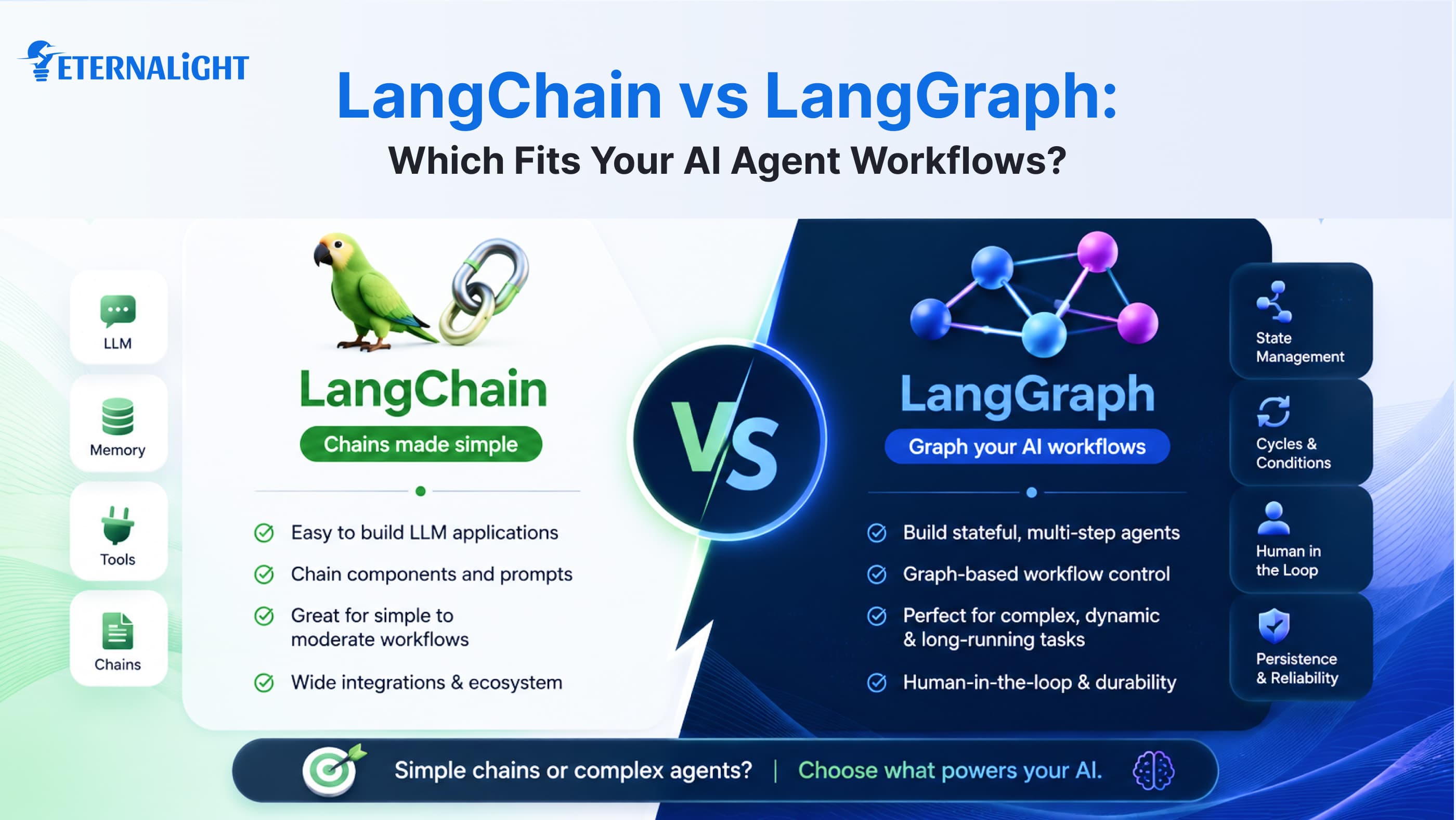
LangChain and LangGraph are frameworks for the development of LLM solutions and AI agents' workflows. Even though both frameworks are similar, they are used in the process of creating workflows of different complexities. LangChain is used for connecting reusable components and integrations, while LangGraph offers developers more freedom in managing stateful and dynamic agent workflows.
By getting familiar with the differences between the LangChain and LangGraph frameworks, it will be easier to choose the appropriate one according to developers' needs.
What Is LangChain?
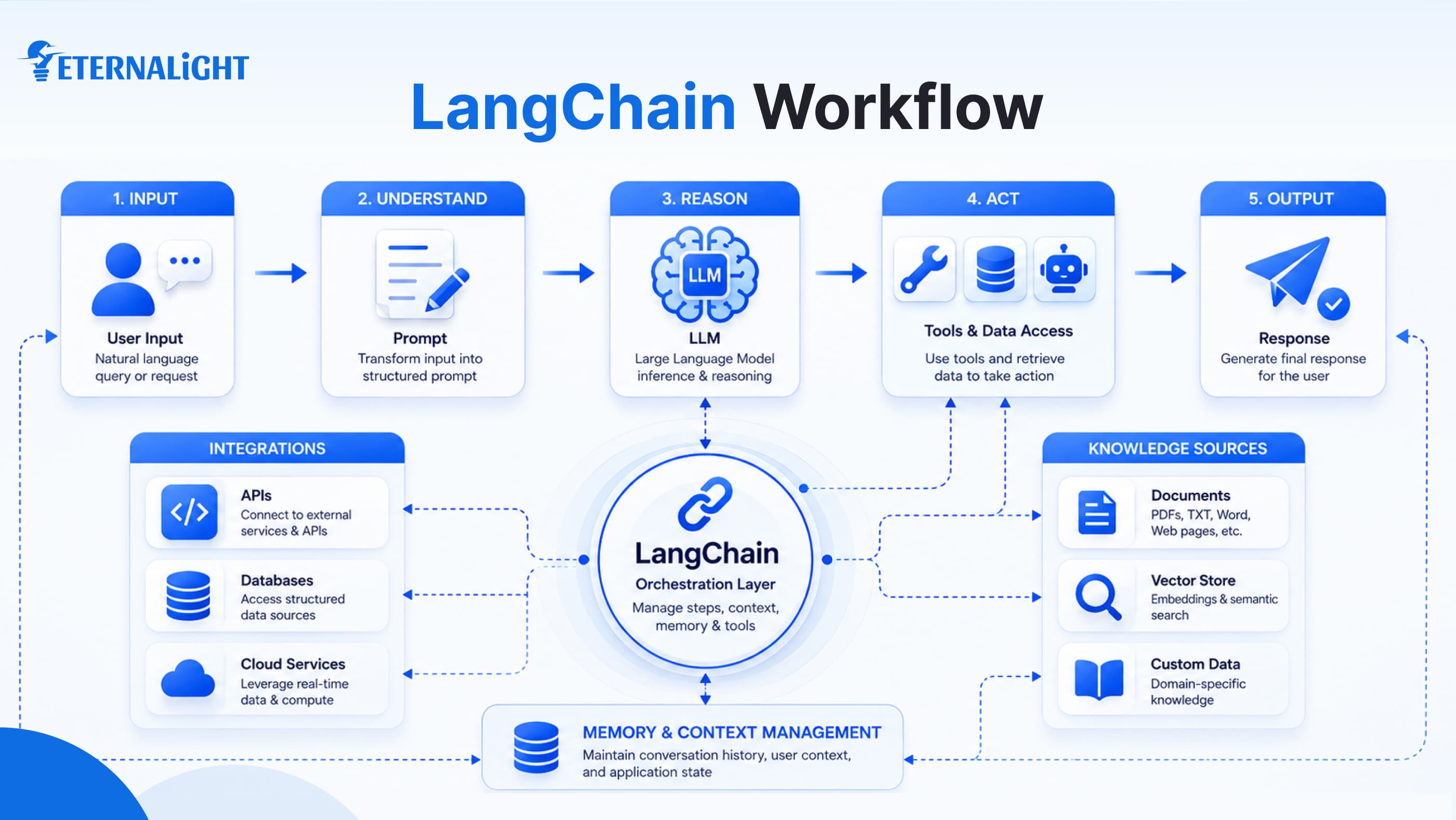
LangChain is an open-source platform to create applications using large language models. It includes reusable elements and connectors that make it possible to tie together LLMs with prompts, other tools, APIs, databases, document sources, and retrievers.
Using these elements, it becomes possible to create applications like chatbots, RAG systems, question-and-answer applications, content generators, and AI assistants. There is no need to connect everything from scratch, because LangChain gives the pieces to build up a workflow from them.
How LangChain Works
A basic LangChain workflow can be represented as:
User Input → Prompt → LLM → Tool/Data Retrieval → Response
For example, a system that uses artificial intelligence to provide customer support. The user poses a question; LangChain obtains this input and retrieves useful information from the database. The information is passed to the language model along with the input obtained from the user.
Additionally, LangChain may incorporate an LLM with third-party tools. For instance, the AI agent could use a search API to retrieve information, a business API to obtain account information, or databases while performing certain tasks that require additional information besides what is present in the model.
Key Features of LangChain
- LLM Integration: Provides components that allow integrating different language models and vendors.
- Prompt Management: Offers building blocks that are required for developing reusable prompts.
- Tool Integration: Enables connecting applications with LLMs using APIs, databases, search engines, and custom functions.
- RAG Components: Provides tools to retrieve data from external knowledge sources and provide proper context to LLMs.
- Chains: Offers the possibility to chain together multiple steps.
- AI Agents: Enables agents to choose and use required tools to perform certain tasks.
- Memory and Context: Assists applications in maintaining relevant data while interacting and working.
- Integrations: Provides integrations with models, vector stores, retrievers, document loaders, and other AI development components.
Simple LangChain Code Example
A basic example can demonstrate how LangChain connects a prompt with an LLM:
from langchain_openai import ChatOpenAI from langchain_core.prompts import ChatPromptTemplate model = ChatOpenAI(model="gpt-4.1-mini") prompt = ChatPromptTemplate.from_template( "Explain {topic} in simple terms." ) chain = prompt | model response = chain.invoke({"topic": "AI agents"}) print(response.content) |
In this case, both the prompt and the model form a chain. Once the topic arrives at the application, the prompt gets filled in and submitted to the LLM, which produces the answer. Other elements can be integrated into the pipeline when more complex operations need to be performed.
What Is LangGraph?
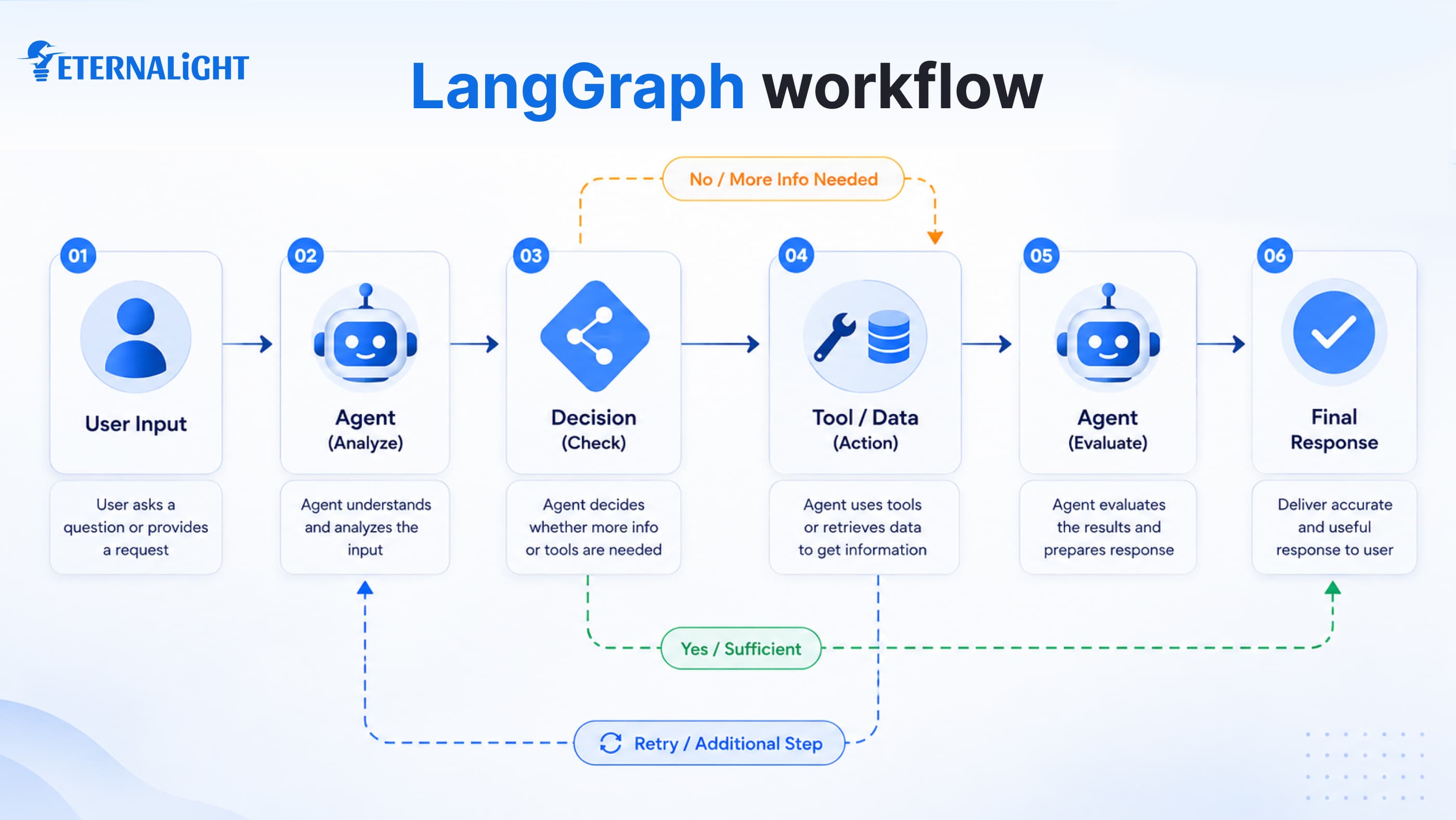
LangGraph is an open-source framework to build stateful workflows of AI agents. It uses a graph-based approach that enables developers to specify the relationships between steps in a workflow, the behaviour at each step, and the transition from one step to the next.
An AI agent is not a linear workflow; it may have to take different paths depending on the information it gets. It may call a tool, evaluate the result, retry an action, go back a step, or wait for human input. LangGraph is designed to facilitate such workflows by representing each step as a node in a graph.
LangGraph is especially helpful when you want to build complex AI agents, multi-step applications, multi-agent systems, and workflows where you want more control over execution.
How LangGraph Works
A basic LangGraph workflow can be represented as:
- State: Maintains and verifies information throughout the workflow.
- Nodes: Represent a single step or action, such as invoking an LLM or a tool.
- Edges: Work out how the flow goes from one node to the next.
- Conditional Edges: The workflow decides the next path based on the current state or decision.
A simplified workflow could look like this:
User Input → Agent → Decision → Tool → Agent → Final Response
For example, an AI support agent may first analyze a user's request. Based on the request, it can decide whether to answer directly or retrieve information from a knowledge base. After receiving the retrieved information, it can evaluate the result and either generate a final response or perform another step.
This ability to create branching paths and revisit previous steps makes LangGraph suitable for workflows that cannot be represented as a simple sequence.
Key Features of LangGraph
- Graph-Based Workflows: Presents AI workflows as interconnected nodes and edges, rather than just sequential.
- State Management: Stores and updates shared state as the workflow moves through its steps.
- Conditional Routing: Agents can route differently based on decisions or workflow conditions.
- Loops and Iteration: Enables workflows where an agent may need to repeat a step or go back to a previous step.
- Persistence and Checkpointing: It helps to maintain the state of the workflow, so that long-running or interrupted tasks can be resumed.
- Human-in-the-Loop: Enables workflows that require human review or approval before continuing.
- Multi-Agent Co-ordination: Enables operation of multiple specialised agents in a structured workflow.
Simple LangGraph Code Example
The following example shows a simple graph where a user message is processed by an LLM before generating a response:
from typing_extensions import TypedDict from langchain_openai import ChatOpenAI from langgraph.graph import StateGraph, START, END class AgentState(TypedDict): message: str response: str model = ChatOpenAI(model="gpt-4.1-mini") def generate_response(state: AgentState): result = model.invoke(state["message"]) return {"response": result.content} workflow = StateGraph(AgentState) workflow.add_node("generate_response", generate_response) workflow.add_edge(START, "generate_response") workflow.add_edge("generate_response", END) app = workflow.compile() result = app.invoke({ "message": "Explain AI agents in simple terms.", "response": "" }) print(result["response"]) |
In this example, the workflow has a state storing the input and response. The generate_response function is a node, and the edges describe the path from the beginning of the workflow to the node, and then to the end. If your workflow needs to branch, call tools, loop, or use multiple agents, you can add more nodes and conditional edges.
LangChain vs LangGraph: What's the Difference?
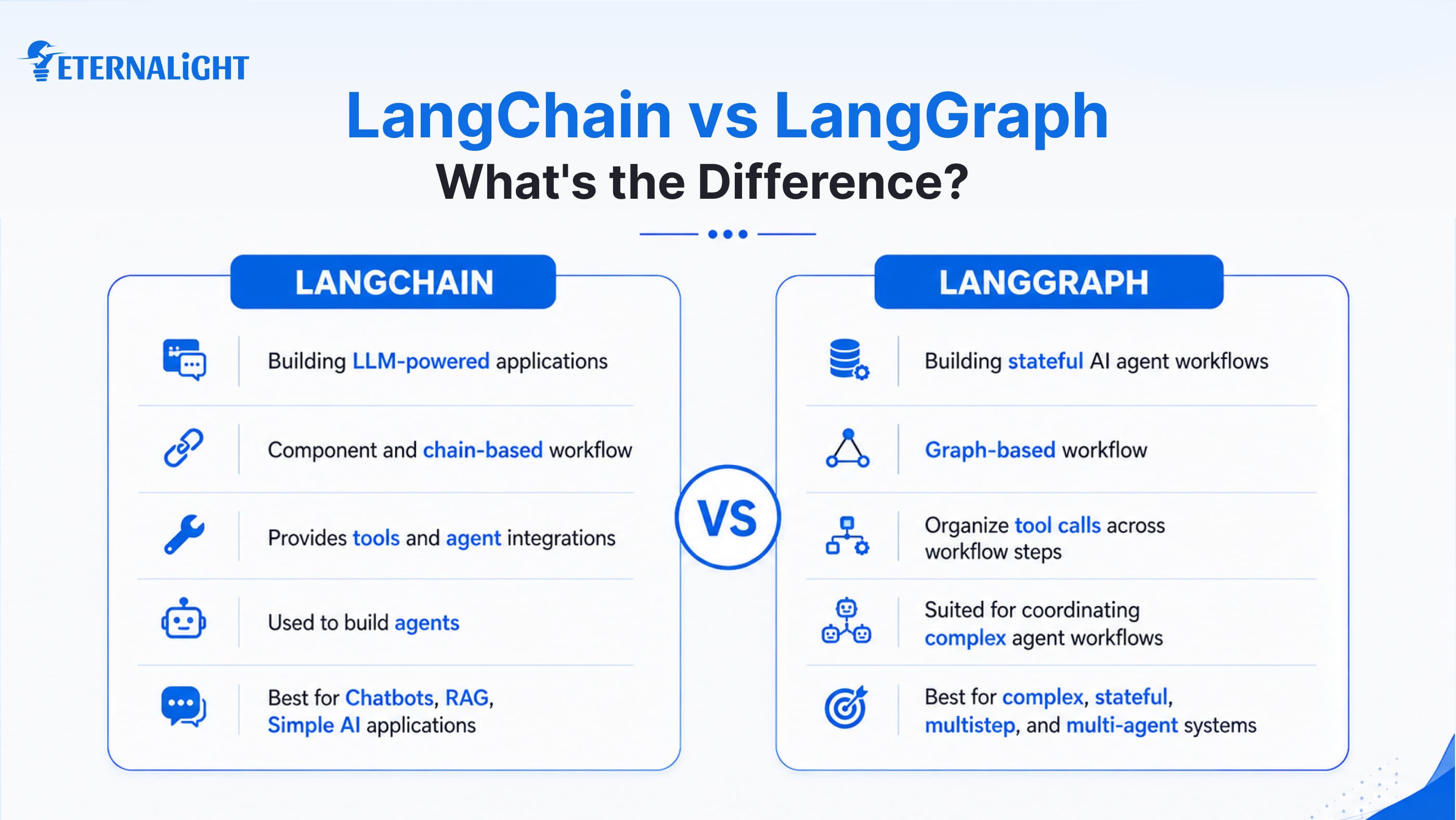
This is the most notable difference between LangChain and LangGraph as far as their use case is concerned. LangChain provides modules for building an LLM-based application, whereas LangGraph deals with managing workflows that need more explicit management of state, branching, loops, and execution of tasks by an AI agent.
It must be noted that LangGraph also integrates very well within the wider LangChain ecosystem, and hence the distinction is not always one between two separate tools. Most of the time, it is possible to use both LangChain and LangGraph together within one application.
Features | LangChain | LangGraph |
Primary Purpose | Building LLM-powered applications | Building stateful AI agent workflows |
Workflow Approach | Component and chain-based | Graph-based |
Workflow Structure | Well suited for straightforward workflows | Designed for branching and dynamic workflows |
State Management | Handles application context through its components | Uses explicit shared state across workflow steps |
Conditional Logic | Can support conditional application logic | Built specifically for conditional routing between nodes |
Loops and Retries | Can be implemented depending on the application | Naturally supports cycles and iterative workflows |
Tool Calling | Provides tools and agent integrations | Can organize tool calls across workflow steps |
Multi-Agent Systems | Can be used to build agents | Better suited for coordinating complex agent workflows |
Human-in-the-Loop | Can be implemented within an application | Supports interruptible workflows and controlled execution |
Best For | Chatbots, RAG, simple AI applications, and rapid development | Complex, stateful, multi-step, and multi-agent systems |
1. Workflow Structure
LangChain is helpful for developers who want to combine components such as prompts, models, retrievers, and tools into an application workflow. For many AI agent use cases, the flow can be relatively simple. Get input, process it, retrieve information (if necessary), and produce output.
LangGraph is more appropriate for workflows where the next step depends on the previous steps. For example, an agent may need to decide whether to call a tool, retry after an unsuccessful result, or switch to another specialised agent. These different paths are made explicit by the graph structure.
2. State Management
State is another essential difference between LangChain and LangGraph. Developers in LangGraph can designate shared state to be managed as the workflow moves through each node. This helps manage longer, more complex processes, as the state can be used to control information flow.
For example, in an agent workflow, the state can manage the user request, tool results, previous decisions, current task, and status. Each node can read or write to the state before passing control to the next node.
3. Branching and Loops
Some AI tasks involve multiple possible actions from which the agent must choose. An agent may also need to perform an action until the results satisfy the requirements repeatedly.
LangGraph is designed to allow the direct representation of branching and looping behavior in workflow definitions. This offers more control to the developer over building agents that can evaluate the impact of their actions.
4. Complexity and Control
LangChain may be a good alternative for building applications in a short amount of time given its extensive integrations and constructs. It is more user-friendly when the application does not require too much complex orchestration.
LangGraph requires developers to design the workflow explicitly, as well as manage and connect different nodes. Given the control offered, LangGraph is a more appropriate choice when the application requirements warrant it.
LangChain vs LangGraph Code Comparison
Consider an AI application that needs to answer a question.
With a simple LangChain workflow, the application can directly connect a prompt to a model:
prompt = ChatPromptTemplate.from_template( "Answer this question: {question}" ) chain = prompt | model response = chain.invoke({ "question": "What is an AI agent?" }) |
The workflow follows a straightforward path:
Input → Prompt → Model → Response
With LangGraph, the same application can define each step as part of a graph:
workflow = StateGraph(AgentState) workflow.add_node("generate_response", generate_response) workflow.add_edge(START, "generate_response") workflow.add_edge("generate_response", END) app = workflow.compile() |
This may look more structured for a simple example, but the advantage is more obvious when adding more steps. For example, the workflow could branch to a tool, evaluate its output, loop back to the agent if additional information is required, or send the task to another agent.
In short, LangChain is often enough for simple LLM application workflows, and LangGraph gives you more control for AI agent workflows that need state, branching, loops, or coordination across multiple steps.
LangChain vs LangGraph: When Should You Use Each?
Choosing between LangChain and LangGraph depends less on which framework is more capable and more on the type of workflow you are building. LangChain is generally a good fit for applications with straightforward flows, while LangGraph becomes more useful when an application needs persistent state, branching, loops, or greater control over agent execution.
When to Use LangChain
LangChain is a practical choice when you want to build an LLM-powered application without managing a highly complex workflow.
Use LangChain for:
- A basic chatbot: Using LangChain can help connect an LLM with prompts and conversation context, as well as access external tools.
- Developing a RAG application: It includes doc loading, retrieval, and passing context to an LLM.
- Your workflow is sequential: Building blocks for a workflow that is sequential and predictable can be provided by LangChain.
- Multiple integrations are needed: LangChain can integrate with models, vector stores, databases, retrievers, as well as external tools.
- MVP Building: Its reusable components help teams build and validate an LLM-based application.
- Simple tool-requirement agents: For an agent with simple tool selection and routing that does not require state transitions, LangChain can be used.
For example, a document-questioning application can follow a simple flow:
User Question → Retrieve Relevant Documents → Send Context to LLM → Generate Answer
There is no need to introduce a complex graph when the workflow remains predictable.
When to Use LangGraph
LangGraph is more useful when a certain AI application needs to manage a workflow that is flexible depending on the agent's decisions or intermediate results.
Use LangGraph when:
- The workflow has multiple decision paths: Different inputs require different actions or different processing paths
- The agent needs persistent state: Information must be maintained and updated during a prolonged workflow
- The workflow has loops and/or retries: An agent may need to evaluate the result several times and take the action again until the goal condition is met
- Human approval is needed: The workflow may need to pause until a human approves it
- You are building multi-agent systems: Multiple specialized agents may need to execute their functions within a controlled workflow
- The application has extended execution: The ability to preserve the progress of the workflow becomes essential when the execution may take multiple extended interactions
- You need detailed control over execution: Developers can explicitly define how the workflow moves between different nodes and states
For example, the workflow of an AI research agent is as follows:
User Request → Research → Evaluate Results → More Research? → Generate Report → Human Review
Since the agent may need to go back to research or evaluate information or wait for the human to approve it, a graph workflow offers more control than a simple sequential chain.
LangChain vs LangGraph for AI Agent Development
The differences between LangChain and LangGraph become clearer when considering the development of AI Agents. An agent would need to understand a request, decide on a corresponding tool, analyze a result, possibly change course, and repeat until a task is completed. As the workflow evolves to become more complex, workflow orchestration and state management become more pertinent.
Building Simple AI Agents with LangChain
LangChain is able to assist in building AI agents that contain a moderate amount of reasoning. An agent is able to understand a user request, identify an appropriate tool, execute the tool, and produce a result.
For example, an assistant that books travel arrangements would perform different tasks to check for flight availability, hotel arrangements, and even local weather:
User Request → Agent → Select Tool → Tool Result → Final Response
A workflow with these constraints does not necessitate a complex graph.
Building Stateful Agents with LangGraph
LangGraph is more appropriate when the agent needs to retain state. An example financial research agent may need to remember companies it has already researched, store the results of its research, assess the results, and even decide to conduct further research.
Such a workflow may look like:
Task → Research → Analyze → Evaluate → More Research? → Final Answer
LangGraph helps developers create a representation of the workflow with operations using nodes and state with edges.
LangGraph for Multi-Agent Systems
Complex tasks may use a number of specialized agents as opposed to one general-purpose agent. For example, a content AI may use:
- Research Agent
- Writer Agent
- Review Agent
- Editor Agent
LangGraph can handle this type of setup. Additionally, LangGraph can specify how different agents can communicate with each other. For example, if the review agent finds a problem with the content, the workflow can return the task back to the writer agent as opposed to terminating the process.
Human-in-the-Loop Agent Workflows
Some AI agents shouldn't be able to perform actions without human interaction. Such tasks may involve sensitive decisions, approvals, or important business actions.
For example:
Agent → Analyze Request → Prepare Action → Human Approval → Execute Action
LangGraph can be suited for this type of workflow. The design can be used to halt the process at a specific point, allow a review of the suggested action by a human, and then continue based on the human's interaction.
Which Framework Is Better for AI Agents?
Neither LangChain nor LangGraph is generally better than the other. LangChain is more useful for beginners building simple agents and agents that require a few tools. However, LangGraph is more useful for cases where agents require state, branching, retry logic, human intervention, or multi-agent coordination.
A good way to visualize the difference is:
LangChain helps you build the building blocks of an AI application. LangGraph helps you control how those agents and components interact with each other through a complex workflow.
Can LangChain and LangGraph Be Used Together?
Yes. LangChain and LangGraph have complementary functions. LangChain has reusable modules like LLM integrations and components like prompts, tools, and retrievers. LangGraph is used for controlling the interaction of the components in a stateful workflow. In many AI agent applications, LangChain and LangGraph are used together.
Let's say a support agent needs an application from an AI development company using LangChain along with an LLM and a knowledge base to which they want to connect the application. For this, LangGraph can be used for workflow management, defined as:
User Query → Classify Request → Retrieve Information → Generate Response → Review → Final Response
Individual components are handled by LangChain, and LangGraph determines the workflow at each stage and what comes next in the workflow.
Example: Using LangChain Components in LangGraph
from typing_extensions import TypedDict from langchain_openai import ChatOpenAI from langchain_core.prompts import ChatPromptTemplate from langgraph.graph import StateGraph, START, END class AgentState(TypedDict): question: str answer: str model = ChatOpenAI(model="gpt-4.1-mini") prompt = ChatPromptTemplate.from_template( "Answer the following question clearly: {question}" ) chain = prompt | model def generate_answer(state: AgentState): result = chain.invoke({ "question": state["question"] }) return {"answer": result.content} workflow = StateGraph(AgentState) workflow.add_node("generate_answer", generate_answer) workflow.add_edge(START, "generate_answer") workflow.add_edge("generate_answer", END) app = workflow.compile() result = app.invoke({ "question": "What are AI agents?", "answer": "" }) print(result["answer"]) |
Here, the LangChain prompt and model chains will handle the response, while LangGraph will manage the workflow and state. More nodes could be added in the future for fetching, calling tools, validation, human review, etc.
This pattern would be useful, especially when the application evolves from a LangChain workflow into an agent system.
Conclusion
LangChain and LangGraph have different roles to play in developing AI applications. LangChain is an API library to integrate LLMs with prompts, tools, data sources, and retrieval engines and is ideal for simple AI applications like chatbots.
LangGraph is for complex and stateful workflows where branching, loops, parallel execution, supervision, and multi-agent execution are necessary.
Choosing between LangChain and LangGraph will depend on your use case. LangChain is best suited for simple applications, but for AI agents that require better control over states and execution, LangGraph is the way to go. You could also use both of them to build AI applications combining reusable pieces and workflows.
If you are planning to build a production-ready AI agent or are struggling to build an optimal AI Architecture based on your workflow, then Eternalight can work with you to design and build AI solutions.

Kusum Sethiya
Software Engineer
Kusum Sethiya is a Software Engineer at Eternalight Infotech, focused on building clean and intuitive. She enjoys turning ideas into reliable applications using modern technologies like Javascript, React, Node.js , and MongoDB.
Related Blogs
- AI & ML10 Mins
AI Doesn't Forget. It Loses Context: How Context Graphs Can Help
Learn how context graphs help AI agents connect information, retain context, and make better decisions with AI memory tools and retrieval systems.
- AI & ML10 Mins
How to Test Generative AI Applications: A Practical Guide to Reliable AI Systems
Learn how to test generative AI applications for accuracy, hallucinations, performance, security, RAG workflows, and reliability.
- AI & ML10 Mins
AI Data Security Strategies: 8 Ways to Protect Data in AI Systems
Explore 8 AI data security strategies to protect sensitive data across prompts, AI models, RAG systems, APIs, access controls, storage, and outputs.