
Software Development
9
Mins
Top Mobile App Development Trends to Watch in 2026
Learn about the latest mobile add development trends that are taking over the world in 2026 and beyond.
Shipping with React Native: How We Build for iOS and Android Without Double Effort
Over the past few years at Eternalight, our team worked across multiple mobile projects where the brief sounded simple on paper: build and ship an iOS and Android app without doubling the engineering effort.
After discussing with many mobile app developers, the reality is cluttered. Along the way, we picked up a few things that follow the reliability factor in apps.
Those are patterns, structure decisions, deployment routines, and a general sense of what actually works.
These problems are never resolved, and they are often encountered in the development world. The reason is not the complexity of the tech stack, but small technical twigs need to be fixed on time.
Beyond just a step-by-step React Native app development tutorial guide, this blog post is a practical implementation in the real world. Sharing the chunks of learning comes from experience.
To keep things structured, this write-up is split into two halves:
1. Why companies build for both iOS and Android, native vs hybrid trade-offs, and where React Native fits
2. Project structure, packages, Android keystore setup, iOS archival, environment handling, and CodePush
One question comes up often when working with founders: “Do we need both apps right now?”
From what we’ve seen across Eternalight’s client work, the answer is almost always yes. Users live in different ecosystems, and ignoring one inevitably limits reach.
In India and other emerging markets, Android is dominant.
In the US, Europe, and parts of East Asia, iOS owns the premium audience.
Products in fintech, health, productivity, transport, commerce, and social need presence on both platforms to stay competitive.
In practical terms, going dual-platform helps companies:
Access the broadest possible user base
No need to rely on one coding environment
Improve engagement and retention
Control the UX far more than a mobile web app can
Thus, when users split across iOS and Android, sticking with a single version may impact engagement. Even early-stage startups now prefer shipping at least a basic version on both stores. It’s worth to build iOS and Android app version using React Native for a company's growth beyond its imagination.
Before choosing React Native for most Eternalight projects, we compared what pure native development actually means. Native apps can attract users, but we can’t neglect their trade-offs.
Consistent, predictable performance
Immediate access to the latest platform APIs
Strong compatibility with camera, maps, Bluetooth, and hardware layers
Smooth animations and UI transitions
Two separate codebases
Two developers or teams
Higher cost and slower development cycles
Every feature has to be built twice
Twice the testing, twice the maintenance burden
Native app development for iOS and Android separately is best when you can stretch the budget without any burden and have intellectual minds to shape it up. However, as the days pass, it becomes difficult to manage the regular progress, and it becomes a tech blocker.
For businesses that need to move fast, this is often where the conversation shifts toward hybrid frameworks.
React Native lands in a sweet spot for most product teams: fast development, near-native performance, and a shared JavaScript/TypeScript codebase.
In our experience, React Native works well when:
The app relies heavily on UI and API-driven screens
The team wants to ship features quickly
Budget, timeline, or staffing constraints exist
The product is evolving fast, especially in early-stage cycles
Over-the-air updates are valuable
React Native isn’t the best fit for:
Heavy multimedia editing
High-end gaming
Low-latency hardware integrations
Deep, platform-specific capability
Certain offline-first encrypted storage patterns
But most apps fall into a middle zone where React Native covers around 90% of the requirements, and a few native modules fill the rest.
We’ve evaluated Flutter, Ionic, and Xamarin on various projects. They each have strengths, but React Native tends to better align with real-world constraints for building iOS and Android apps.
Uses JavaScript/TypeScript—languages most teams already know
Mature ecosystem: React Navigation, Zustand/Redux, Reanimated
Strong community support and issue resolution
Easy hiring compared to other ecosystems
CodePush enables near-instant UI updates
Plays nicely with design systems and custom components
Integrates more naturally with native modules when needed
Flutter is solid, but the Dart adoption curve, larger binary sizes, and a custom rendering engine don’t always align with business priorities.
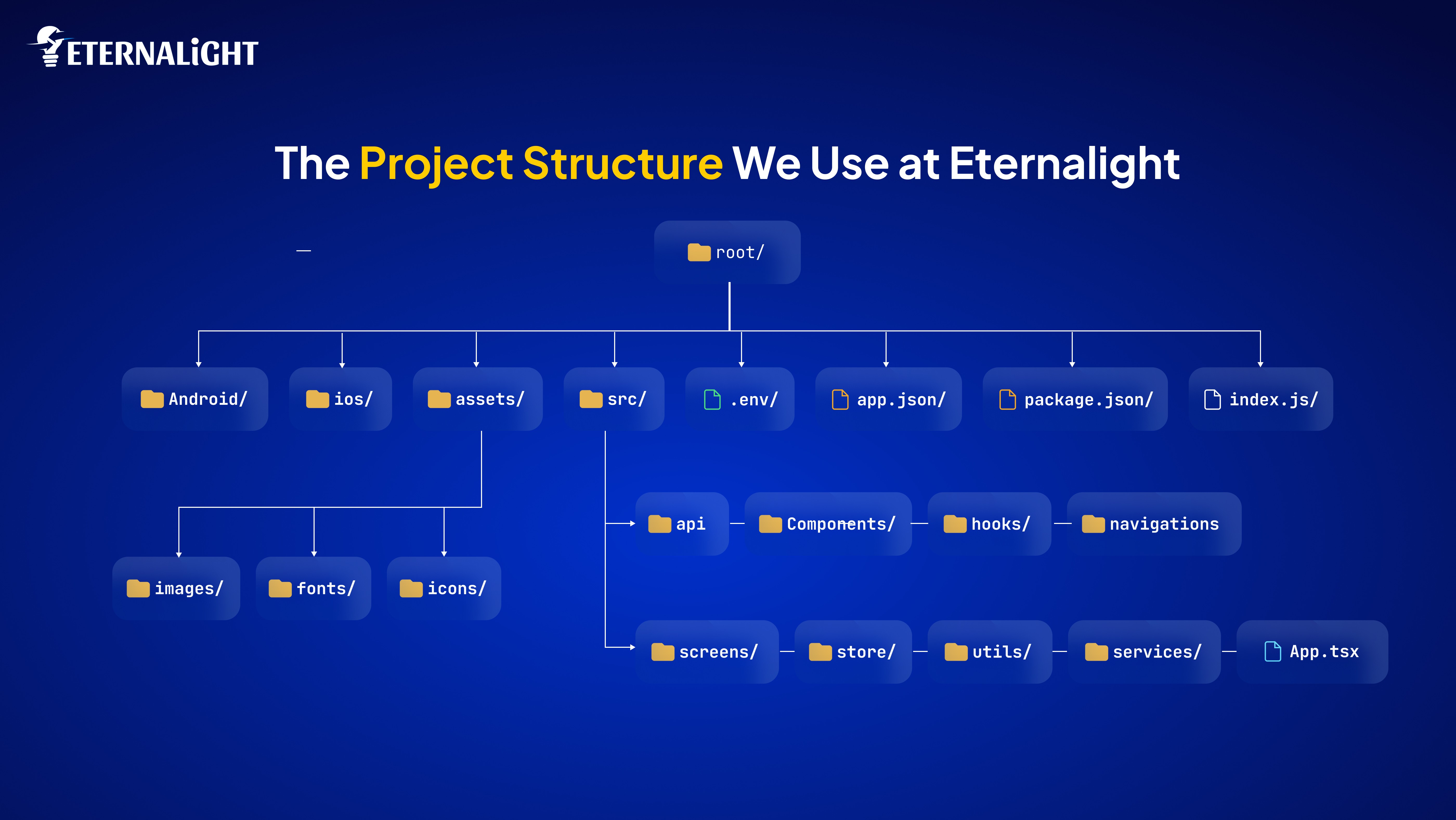
One thing we've learned while developing iOS and Android apps with React Native: structure matters. A messy root directory becomes a debugging nightmare. Over time, our go-to layout has stabilized into this:
Everything app-related stays inside src/ while native folders remain untouched.
Zustand Example:
Redux Toolkit Example:
Axios
AsyncStorage
Reanimated & Gesture Handler
react-native-config
It’s been a very challenging phase for many mobile app development teams who struggle during their first iOS app releases. However, we have discovered the way to deal with this. Here are the steps that have consistently worked for us, which may also work for your team.
gradle.propertiesbuild.gradleUpload the AAB to the Play Console.
While using React Native for the iOS app phase is straightforward for those who regularly use it, it initially seems complicated to everyone. Our developers have followed this flow to drive consistency in our work and solve puzzle-like scenarios.
Open:
Choose:
Then:
Product → Archive → Distribute App → App Store Connect → Upload
Next, need to update metadata, upload the screenshots, and privacy details in App Store Connect. Once done, we can hit submit for review.
To avoid any mihapps encounters and maintain cleanliness, that's what every react native app development team prefers:
CodePush is one of the most underrated advantages of React Native. For UI fixes and small patches, it saves days of waiting for App Store review.
Hope this guide will help you to build iOS and Android app using React Native.
Most of the mobile products we’ve built at Eternalight Infotech follow a similar journey: fast iteration, controlled releases, and a need to support both iOS and Android without doubling the engineering footprint. React Native fits that mindset well. It matches the rhythm of web development and the pace of native app development, and also flexes the capabilities of robust shipping.
While choosing any techstack, don’t think only from a technical perspective, but be strategic. When we decided to use React Native to build iOS and Android apps, we researched across competitors and industry domain use cases and found that it suits well as a modest and technically fit.

Yash Maurya
(Author)
Frontend Software Engineer
Contact us
Send us a message, and we'll promptly discuss your project with you.