
Software Development
9
Mins
Top Mobile App Development Trends to Watch in 2026
Learn about the latest mobile add development trends that are taking over the world in 2026 and beyond.

Have you ever been stuck in a mishap like a React UI freeze while typing, or a bundle size creeping up, without an alert?
What happened then undoubtedly shattered the trust.
We can say here, most React apps aren’t slow because “React is heavy.” They’re slow because we throw state and effects everywhere, ship way too much JavaScript, and never look at a profiler until something is on fire.
In this blog, we’re uncovering the best practices for optimizing React App performance to make them faster.
If you’ve been around a bit, you’ve probably done some of this already: cut down useEffect, moved UI state into a small store like Zustand, used TanStack Query for caching, optimized your SVGs, and tried to keep components modular. This post is about putting all that into a clear mental model: how to spot real React performance optimization issues, what “optimized” actually means, and why we prefer specific tools (Zustand, TanStack Query) while still acknowledging they’re not the only game in town.
While working with a team whose dashboard took nearly 6 seconds to load, everyone assumed it was an API issue. Turns out, 68% of the delay was just React re-rendering things it didn’t need to. One tiny fix to memoization cut the load time in half.
React Query handles the entire lifecycle of fetching data. It reattempts failed requests, caches when needed, and restricts re-fetching to only when actual changes occur.
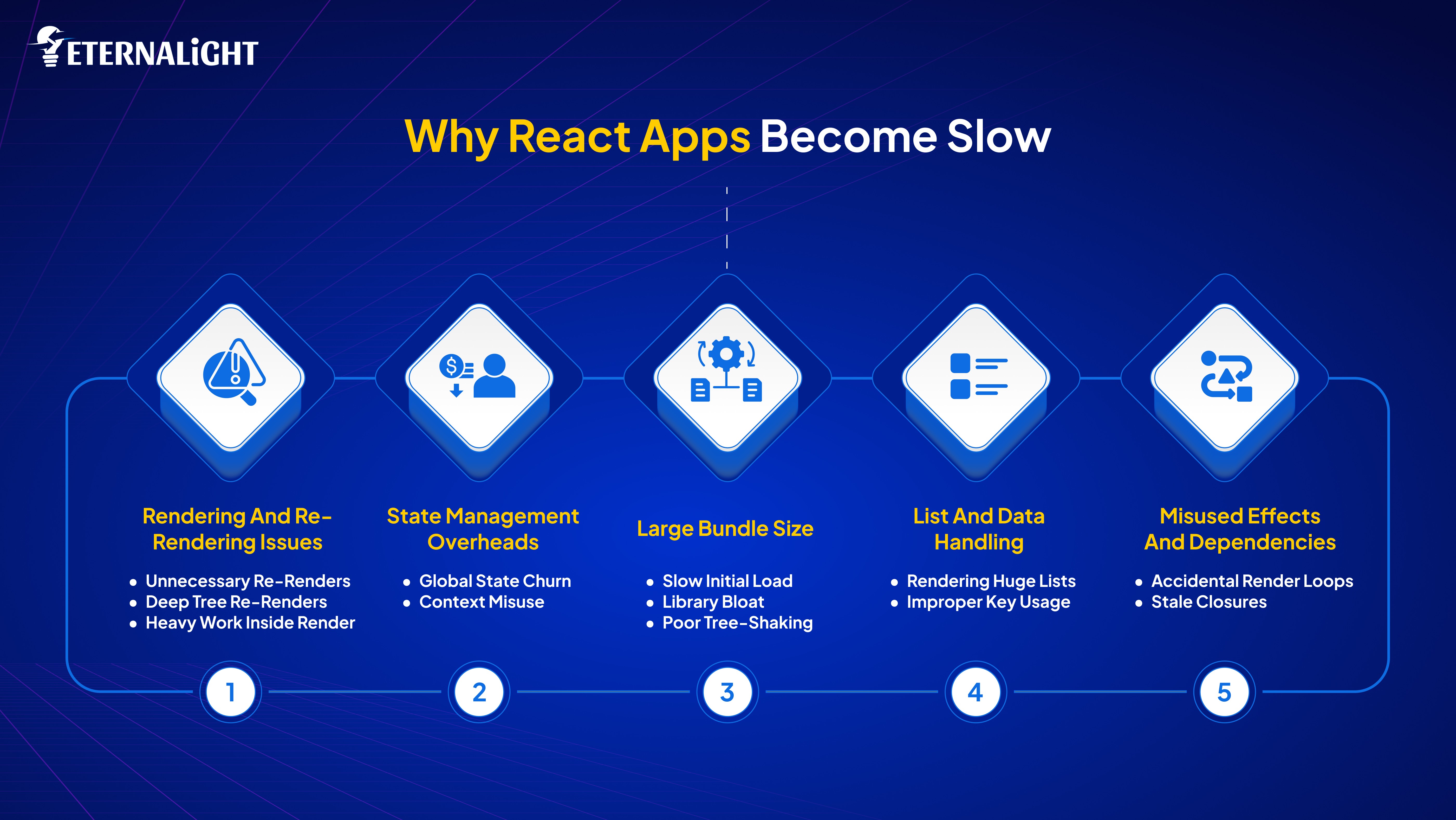
Unnecessary re-renders
Components render even when the actual UI doesn’t change. New object or array references, or parent re-renders, cause wasted work.
Deep tree re-renders
A small state change high in the tree forces every child below it to re-render unless isolated or memoized.
Heavy work inside render
Expensive calculations placed directly in component bodies run on every render, increasing CPU usage and slowing the interface.
Global state churn
Updating global stores like Redux or Zustand triggers re-renders across many components, even those that don't use the updated slice.
Context misuse
Large contexts cause all-consuming components to re-render whenever the value changes, even if they don’t need the updated part.
Slow initial load
Users must download and parse a large amount of JavaScript before anything becomes interactive.
Library bloat
Heavy libraries end up in the main bundle even if only a small portion is used.
Poor tree-shaking
Some dependencies include unused code because they aren’t optimized for tree-shaking.
Rendering huge lists
Rendering hundreds or thousands of DOM nodes at once leads to lag and memory pressure.
Improper key usage
Missing or unstable keys cause React to re-create DOM elements, unnecessarily breaking reconciliation optimizations.
Accidental render loops
Incorrect or missing dependency arrays cause effects to run repeatedly, triggering state changes that loop indefinitely.
Stale closures
Using outdated variables in effect causes bugs, repeated fixes, and complex patterns that slow down the app.
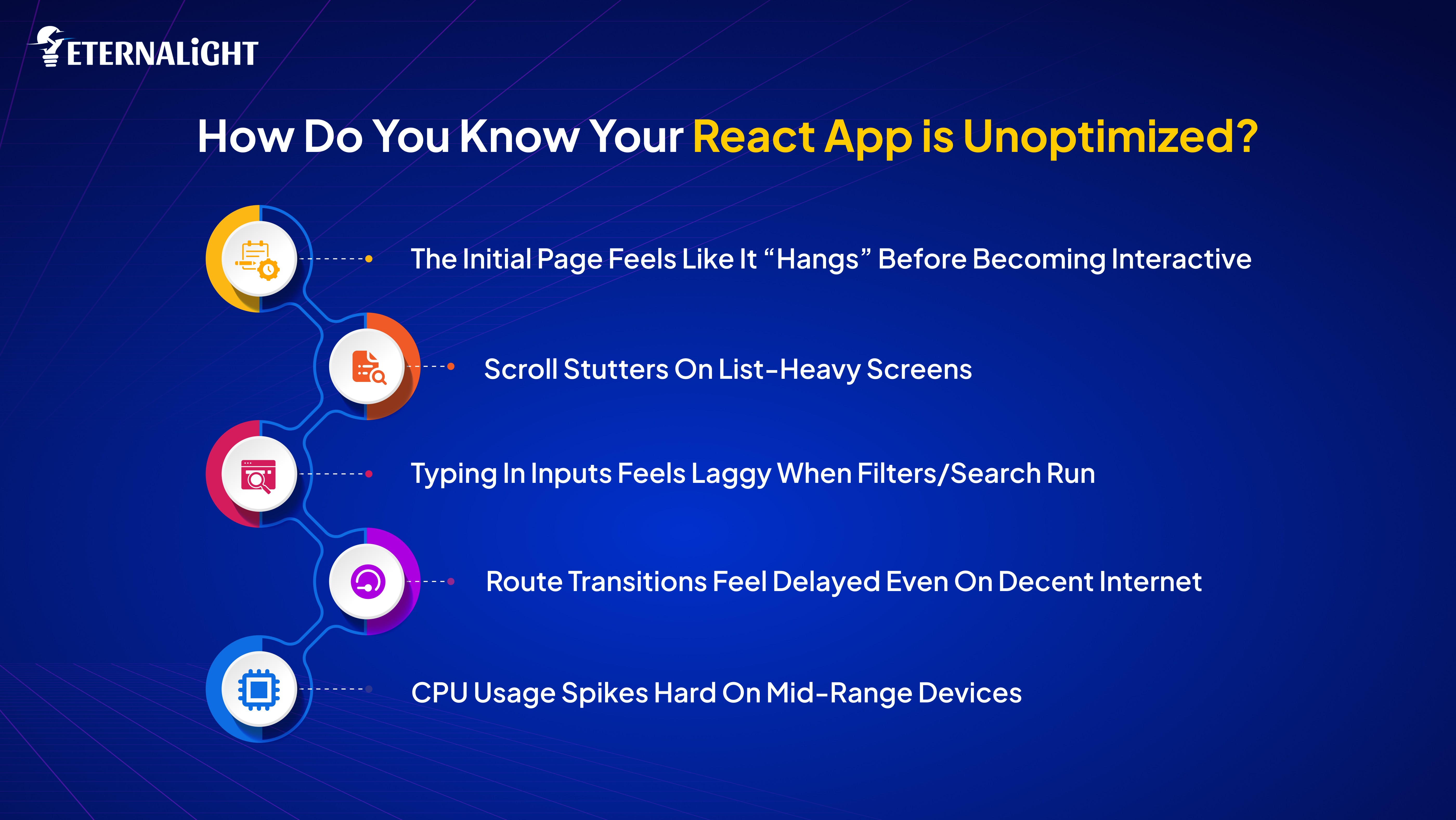
Before talking about patterns and tools, it’s worth answering a fundamental question: how do you know you even have a performance problem?
Some very down-to-earth signals:
The initial page feels like it “hangs” before becoming interactive
Scroll stutters on list-heavy screens
Typing in inputs feels laggy when filters/search run
Route transitions feel delayed even on decent internet
CPU usage spikes hard on mid-range devices
That’s the “vibes” layer. Underneath, there are actual metrics.
You don’t need to memorize all the acronyms, but these matter to optimize React app:
First Contentful Paint (FCP): how quickly things load for the first fold of content for users.
Largest Contentful Paint (LCP): how much time it takes to display the main body content.
Time to Interactive (TTI): how long until the page responds reliably.
Total Blocking Time (TBT): how much time the main thread is stuck running long tasks.
Cumulative Layout Shift (CLS): how fast the visual elements shift, measuring that score.
You can get these insights and assistance from Lighthouse, Web Vitals, or your framework’s built-in tooling.
This is where React DevTools Profiler comes in:
Components that re-render too often on simple interactions
Expensive renders (big spikes in the flamegraph)
Commits that take too long
Lists where every single item re-renders for tiny state changes
Components that light up on the profiler even when you didn’t expect them to re-render
An “optimized” React app is one where:
Initial load is fast enough that users don’t get annoyed
Interactions stay under ~100ms perceived delay
Re-renders are limited to components that actually need to be updated
You can explain where the state lives and why
Bundle size is reasonable for your use case and target devices
If you can’t explain why something is rerendering or where the data is coming from, you’re probably paying unnecessary performance tax.
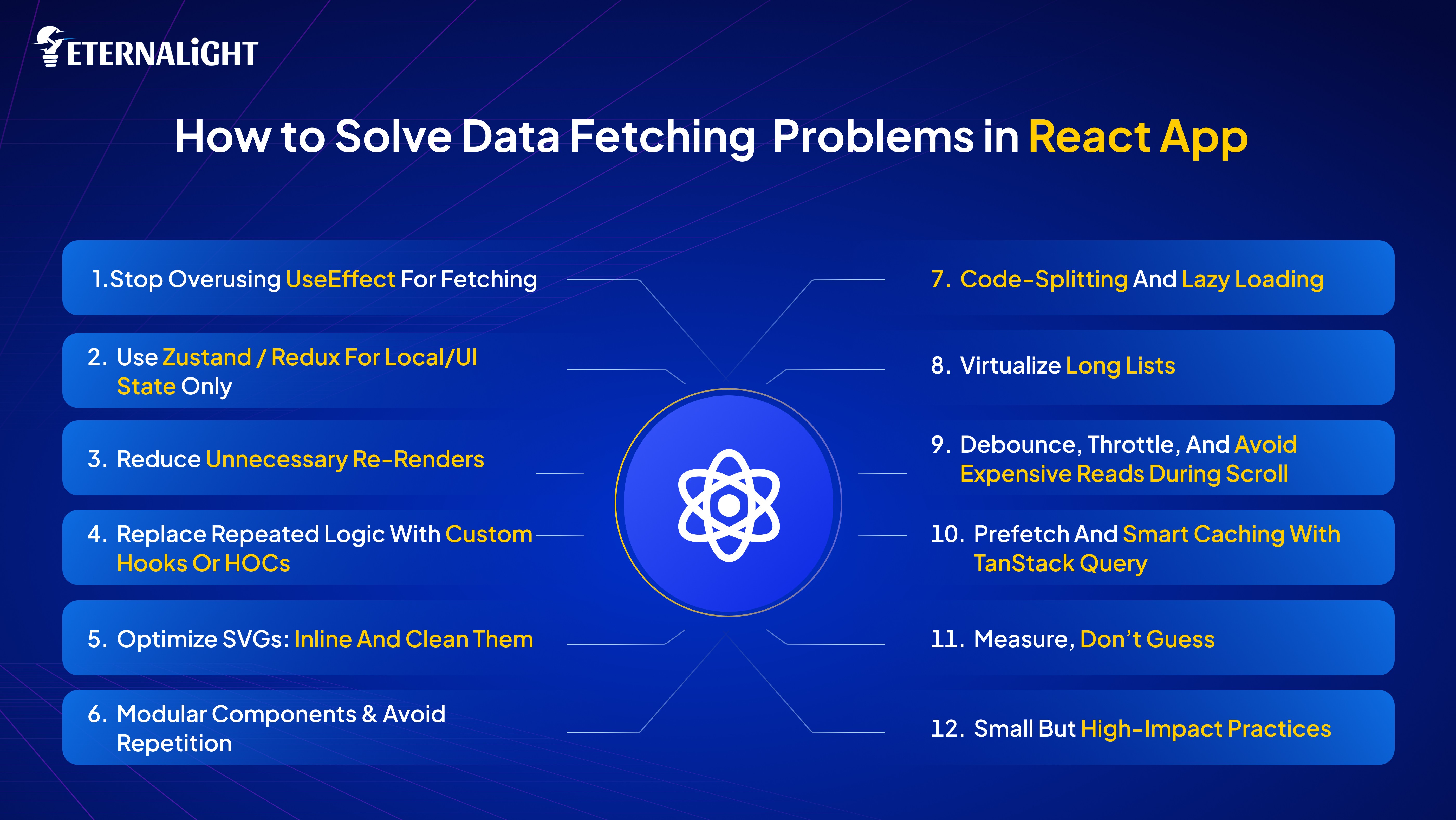
From our perspective, we don’t need to rewrite or revamp the code from scratch; small changes can consistently optimize the React app's performance.
Move server state to a caching layer (TanStack Query) and stop using useEffect for data fetching.
Keep global state minimal: use Zustand/Redux for UI-only state, not for remote data.
Reduce re-renders: memoize components, handlers, and computationally expensive operations.
Use code splitting and lazy loading for routes and heavy components.
Optimize assets: SVGs as components, compress images, lazy-load offscreen assets.
Keep components small and modular; reuse via HOC or hooks rather than copying code.
Virtualize long lists, debounce/throttle frequent events, and prefetch critical data.
Measure with Lighthouse/React DevTools and iterate.
Let’s discuss useEffect in next fold.
One thing worth explaining clearly: useEffect wasn’t designed to be a data-fetching mechanism. It runs after the component renders, so you get double renders in Strict Mode during development.
It’s tied to the lifecycle, so the fetch runs again whenever dependencies change often unintentionally. You have to manage race conditions, abort signals, stale state, and boilerplate for loading and errors manually.
Multiple components can trigger duplicate fetches for the same resource. This is precisely why libraries like TanStack Query exist.
useEffect for FetchinguseEffect is great for side-effects. It is not a substitute for a cache, background revalidation, or deduplication. Fetching directly in useEffect leads to repeated requests, tightly couples UI to fetch logic, and makes cancellation/error handling boilerplate.
Use TanStack Query (React Query) to fetch and cache server data. It handles dedupe, background refetch, caching, invalidation, retries, and prefetching.
No useEffect, no manual abort controller, no duplicated loading states across components. TanStack Query does the heavy lifting.
Don’t just head straight to the tech stack to explore the best tools and patterns to optimize React app performance; categorize the problem first, since multiple key factors impact the React app.
Unnecessary use of Global State
Excessive use of JS in the initial
Lengthy long list
Unnecessary re-rendering
When all these things occur, it's difficult to control the side effects. The tools you choose are simply ways to avoid those costs.
Once you outgrow basic context, you need a system that lets components subscribe only to the parts of state they care about. Zustand does that without a heavy setup. It’s small, easy to read, selector-based, and doesn’t require reducers or action creators. It works exceptionally well for UI concerns such as modals, sidebars, temporary filters, selected IDs, and layout preferences.
Reasons it performs well:
• Components subscribe to specific slices instead of the whole store
• No large context value being replaced
• Minimal boilerplate makes state updates predictable
• Minimal API surface, so it’s hard to misuse
Zustand isn’t the only choice to optimize React app frontend. For heavy apps, Redux Toolkit is also worth utilizing, as it offers a structured approach. Apart from this, if you’re looking for something highly polished with sticky updates, try Jotai or Recoil.
For flow-heavy apps with multiple possible states, XState gives you deterministic behavior. And if the global state is tiny and stable, React’s own context is still enough.
Zustand is simply the comfortable middle: small, fast, ergonomic, and significant for UI-level global state.
Zustand is tiny and significant for global UI concerns (modals, theme, small form state). Don’t mix server data and optimistic caches here; keep that in TanStack Query.
Use this in components without causing server-state weirdness.
A price calculator that recomputes every keystroke slows the entire form. Wrapping the computation in useMemo keeps the UI responsive without touching the logic.
Too many renders are the silent CPU killer. A few small rules:
Wrap heavy components with React.memo.
Memoize handlers with useCallback when passing to memoized children.
Memoize expensive calculations with useMemo, or better, move calculations out of render.
Avoid inline object/array literals in props.
React.memo only helps if props are stable. Make them stable.
If you’re copy/pasting logic across components, make a hook or an HOC. Hooks are usually better for composability.
usePaginatedQueryUse across list components; never repeat pagination code.
SVGs are heavy but can’t unlock their full potential. Optimizing them (SVGO) and wiping metadata that is not required will shift the load. Also, when we convert them into React components, you get control over props (fill, stroke) and can eliminate extra network requests.
Import and style with CSS variables or Tailwind classes. Inline SVGs mean no extra request and easy theming.
Single Responsibility components should do one thing. Compose them. This reduces duplicate bundle sizes, simplifies memoization, and accelerates development.
Small components are easier to lazy-load too.
Don’t ship the gallery component to users who open the settings page. Use React.lazy + Suspense or route-level splitting with your router.
Prefetch meaningful chunks when you can (on hover or in useEffect when the route link appears).
Rendering thousands of rows is unnecessary. Instead, practice virtualization (react-window or react-virtual).
Input handlers, resize, and scroll events can crush the main thread if unthrottled. Use requestAnimationFrame or debounce/throttle.
Prefetch on hover or when a link becomes visible to decrease perceived latency. Use optimistic updates for mutations that are instant-feeling.
No need to make assumption
Use Lighthouse, React DevTools profiler, and the network tab. Optimize what the profiler shows. If you throw micro-optimizations at code without measuring, you’ll waste time.
Bundle analysis: remove big deps or lazy-load them.
Tree-shake: import specific functions, not whole libs.
HTTP caching and headers: set long cache for immutable assets and use cache-busting filenames.
Critical CSS: ship above-the-fold styles first.
Server-Side Rendering (SSR) / Edge: for first contentful paint improvements where appropriate.
Image formats: use AVIF/WebP; use responsive srcset; lazy-load non-critical images.
Avoid large polyfills: ship them only where needed.
Sharing the example in next section for better understanding.
This is a minimal view of how architecture fits:
UI store (Zustand): modal open, theme, ephemeral UI
Server state (TanStack Query): todos, user profile, search results
Presentation components: memoized, small, modular
Routes: code-split
Assets: optimized SVGs and responsive images
Utilities: common hooks for fetch/pagination
Fetch data in useEffect in multiple child components instead of a single query hook.
Store API data in global stores meant for UI only (Zustand), then write custom cache logic. Don’t.
Over-memoization: wrapping everything in useMemo because "performance". No measure.
Inlining big SVGs in the DOM without compression, or shipping dozens of icon files instead of a single sprite or componentized SVGs.
Problem: React.memo not working, child still re-renders.
Fix: Check props: Are you passing new inline objects/functions? Use useCallback/useMemo or derive data outside render.
Problem: Too many revalidations from TanStack Query on window focus.
Fix: configure refetchOnWindowFocus: false or set it per-query.
Problem: Mutation causes stale UI or flicker.
Fix: Use optimistic updates with onMutate and rollback logic.
Problem: Big initial bundle from a UI library.
Fix: Tree-shake imports, lazy-load heavy components, or replace with smaller alternatives.
Before wrapping up the app for final release do this:
Server interactions moved to TanStack Query
Use a dedicated data-fetching library to handle caching, retries, and background updates cleanly.
Global state limited to UI concerns (Zustand)
Keep the global state small and focused on view/UI behavior to avoid unnecessary renders.
Large lists are virtualized
Only render what’s visible in the viewport to prevent performance bottlenecks.
Heavy computations memoized outside the render phase
Move expensive logic into memoized functions/hooks to keep rendering fast.
Route-heavy components are lazy-loaded
Implement code splitting so users load only what they need immediately.
SVGs are optimized and inlined
Minify SVGs and inline them when reusable to improve load times and reduce DOM overhead.
Common or duplicate logic extracted into custom hooks/HOCs
Reduce repetition and keep behavior consistent and easier to maintain.
Tests and performance benchmarks confirm improvements
Validate that the final build actually performs better and behaves correctly.
This shows a small useTodos hook that combines TanStack Query and a Zustand UI state flag to demonstrate separation:
This keeps fetching logic in the query layer, UI input in the Zustand store, and lets the component concentrate on rendering.
That’s a complete, deployable mental model plus examples:
The sort of clear separation between who owns what saves future-you from debugging spaghetti for months. You've already implemented many of these; add the rest progressively.
Start by moving any useEffect fetches to TanStack Query and creating a few reusable hooks. That alone usually halves network noise and repeated rendering.
Now, here’s a quick look at where we applied these ideas in a real system and the improvements they drove.
At Eternalight Infotech, we had to address this problem in the real world while revamping Scrut Automation’s legacy React application. The original version started fine, but as modules and submodules kept growing, the cracks became obvious.
Most of the slowdown stemmed from the same patterns described earlier: excessive state being passed around, repeated fetches across components, components handling multiple unrelated jobs, and no clear separation between UI state and server data.
By the time new features were being planned, the app felt heavier with every release. The team eventually reached a point where adding new modules took longer than it should, simply because the existing structure didn’t scale.
During the revamp, we introduced a cleaner architecture built around TanStack Query for server data and Zustand for predictable UI state. Server state stopped leaking into global state, duplicate fetches disappeared, and components became much easier to reason about.
We also reorganized the codebase into smaller modules and shared hooks, which greatly sped up the development of new features.
Once these foundations were in place, the performance gains were evident. Pages mounted faster, interactions stayed responsive, and the overall code quality was significantly higher. Most importantly, adding new modules no longer felt like fighting the old structure at every step.
This experience reinforced a simple lesson: performance is much easier to maintain when the architecture supports it from day one. Tools like Zustand and TanStack Query aren’t magic, but when combined with clean boundaries and modular code, they make React apps far more scalable and enjoyable to work with.
Finishing Here !
Optimising a React app frontend isn’t about chasing clever tricks; it’s about making disciplined, practical decisions that hold up as the codebase grows. Moving server data to a proper caching layer, keeping global state focused on UI, reducing unnecessary re-renders, modularising components, and treating assets responsibly are all small steps that add up to a noticeably smoother product.
In real projects, performance problems rarely arise from a single major mistake. They come from dozens of tiny inefficiencies slowly stacking on top of each other. The patterns in this guide consistently prevented the slow creep in my own applications.
When the boundaries between UI state, server state, rendering, and component responsibility are clear, the entire frontend becomes more straightforward to maintain, faster to iterate on, and far more pleasant for users to interact with.
Ship thoughtfully, measure often, and let React do what it’s good at: rendering efficiently when you give it the chance.
https://react.dev/learn/you-might-not-need-an-effect
https://dev.to/nikl/react-is-slow-what-to-do-now-369g dev.to
https://web.dev/articles/virtualize-long-lists-react-window web.dev
https://blog.logrocket.com/rendering-large-lists-react-virtualized/ LogRocket Blog
https://blog.sentry.io/react-js-performance-guide/ Product Blog

Kanishk Kashyap
(Author)
Software Development Engineer - 1
Contact us
Send us a message, and we'll promptly discuss your project with you.