
Are you still using useMemo(), forwardRef(), and your own loading state handlers? React 19 introduces powerful improvements that simplify how developers build modern web applications. With automatic optimizations, native async workflows, and cleaner APIs, it helps teams write faster, more maintainable code.
The React 19 stable release introduces several improvements that help developers save time and build faster, more scalable applications.
React 19 Features Overview
React 19 is the latest stable version of React, bringing significant improvements to performance, developer experience, and application scalability. The React 19 stable release date was December 2024, introducing built-in capabilities that reduce boilerplate code and simplify modern web development.
Some of the most impactful new features in React 19 include the React Compiler, Server Components, Actions, useActionState, useFormStatus, useOptimistic, the new use API, and simplified ref handling. Together, these React 19 features help developers build faster, more maintainable applications while improving user experience.
What’s new in React 19: features and capabilities
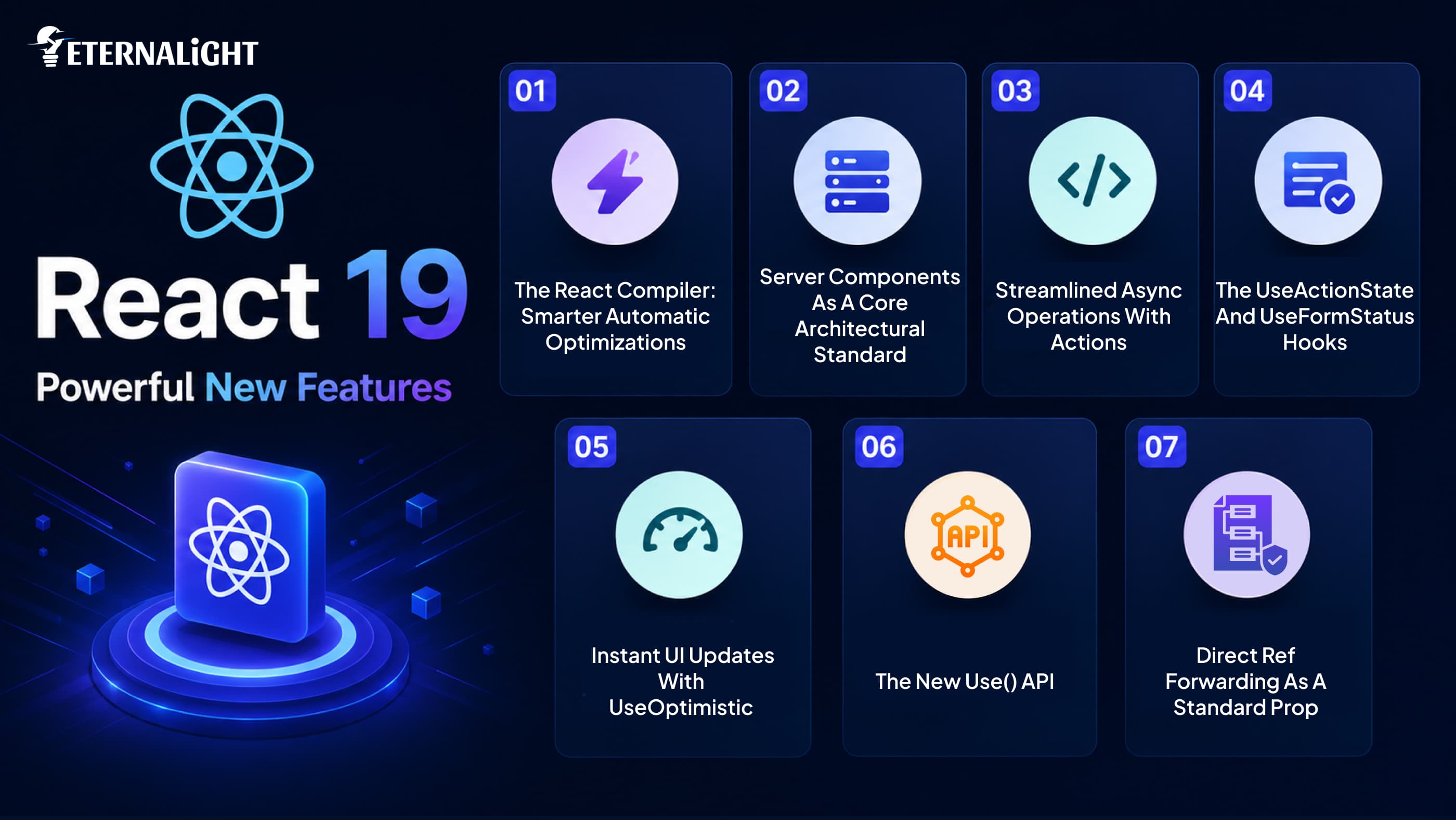
React 19 introduces powerful improvements that simplify development, enhance performance, and reduce the need for common workarounds. Whether you're building new applications or upgrading existing ones, these features can help you write cleaner, more efficient code.
These updates are designed to address many of the challenges developers face in day-to-day React development. By introducing more built-in functionality and refining existing capabilities, React 19 helps reduce unnecessary complexity, improve code maintainability, and create a smoother development workflow. The result is an ecosystem that supports faster development without compromising application quality or scalability.
From improved form handling to better server rendering and smarter resource management, React 19 focuses on making modern web development faster and more intuitive. Let's dive into the seven standout features that every developer, designer, and tech decision-maker should know.
1. The React Compiler: Smarter Automatic Optimizations
If you’ve ever managed a large dashboard or a complex data UI, you know how easily unnecessary component re-renders can slow things down. Historically, developers had to protect performance by wrapping code in manual optimization layers.
However, without doubt, the headline feature in React 19 is the brand-new React Compiler. The React Compiler is one of the biggest additions in React 19. It analyzes your components during compilation and automatically applies performance optimizations where appropriate.
What actually changes for your team?
- Reduced manual memoization: The React Compiler automatically optimizes many rendering scenarios, reducing the need for useMemo(), useCallback(), and React.memo() in many applications. However, some advanced use cases may still benefit from manual optimization.
- Smart UI updates: The compiler accurately figures out exactly when a component needs to re-render, keeping the interface snappy without developer intervention.
- While the React Compiler automates many optimizations, understanding proven React performance optimization techniques can help you build even faster and more efficient applications.
- Cleaner source files: Stripping out these performance hooks leaves you with clean, readable JavaScript.
For startups and enterprise products, this shifts engineering hours away from tedious micro-optimizations. Your team can focus on shipping features that users actually interact with, confident that the build system handles runtime efficiency under the hood.
Teams modernizing older React applications can combine these improvements with proven migration strategies. Read Modernising Your React App: Real-World Lessons & Code Strategy to understand how to upgrade existing codebases efficiently.
2. Server Components as a Core Architectural Standard
React Server Components are officially supported in React 19 through frameworks such as Next.js, although framework support is required to use them effectively.
React Server Components deliver the greatest benefits when used with frameworks like Next.js that support the React Server Components architecture.
By running components directly on the server before anything hits the pipeline, React 19 dramatically slashes the volume of heavy JavaScript sent down to the user's browser.
// Example of a React Server Component fetching data directly from a source
import { fetchLatestProducts } from './db';

export default async function ProductCatalog() {
  const products = await fetchLatestProducts();

  return (
    <div className="catalog-grid">
      {products.map(product => (
        <div key={product.id} className="card">
          <h3>{product.name}</h3>
          <p>${product.price}</p>
        </div>
      ))}
    </div>
  );
}
The effect on the business:
- Page load nearly instantly: Since the layout is processed on the server, the user gets the primary information on the web page almost instantly, bypassing client-side processing.
- Access to data sources directly: Components running on the server can be connected directly to databases and other microservices, without having to create an extensive number of APIs.
- Increased exposure in search engines: Search engines receive already rendered code, making it easier for them to index public websites and online stores, giving businesses a competitive SEO edge.
If you're planning to build a scalable React application using React 19, our ReactJS development services help businesses implement modern architectures, optimize performance, and accelerate product delivery.
3. Streamlined Async Operations with Actions
Handling asynchronous tasks like updating user settings or managing a multi-step checkout form traditionally meant writing repetitive states for loading spinners, error catches, and success messages.
React 19 introduces Actions, allowing asynchronous functions to be used directly with forms. React automatically manages pending states, form submissions, and UI updates, reducing the need for manual loading and error handling in many common scenarios.
// Using React 19 native form actions with async logic
async function updateProfileCard(formData) {
  const updatedName = formData.get("userName");
  await saveProfileToDatabase({ name: updatedName });
}

function ProfileForm() {
  return (
    <form action={updateProfileCard}>
      <input type="text" name="userName" placeholder="Enter name" />
      <button type="submit">Update Profile</button>
    </form>
  );
}
With this native setup, form submissions, data updates, and UI changes handle their own pending states out of the box. This removes the need to track loading flags or manually toggle spinners for simple user inputs.
4. The useActionState and useFormStatus Hooks
To support Actions, React 19 introduces specialized hooks that keep forms and user interfaces perfectly synced without extra code.
Managing Form States with useActionState
The new useActionState hook monitors the lifecycle of an async action. It automatically provides the final execution result, the form function wrapper, and a clean boolean indicating whether the task is currently running.
import { useActionState } from 'react';

function SubscriptionBox() {
  const [message, submitAction, isPending] = useActionState(async (prevState, formData) => {
    const email = formData.get("email");
    return await registerSubscriber(email);
  }, null);

  return (
    <form action={submitAction}>
      <input type="email" name="email" required />
      <button type="submit" disabled={isPending}>
        {isPending? 'Subscribing...': 'Join Newsletter'}
      </button>
      {message && <p className="status-feedback">{message}</p>}
    </form>
  );
}
Accessing Context with useFormStatus
The useFormStatus hook functions like a direct connection for context, allowing deep-nested components to access the context of their parent forms’ statuses without drilling context data across multiple component layers. For instance, the custom submit button, which could be within a form, will recognize whether that form is submitting or not and disable itself automatically from submitting again.
5. Instant UI Updates with useOptimistic
With the increasing expectations of today’s Internet user regarding responsiveness, there is no room left for waiting for network replies for simple interactions such as posting comments, clicking the “like” button on a blog post, or writing an email.
UseOptimistic provides a solution by offering the ability to instantly update the UI with the expected outcome.
import { useOptimistic } from 'react';

function ChatRoom({ initialMessages }) {
  const [optimisticMessages, setOptimisticMessages] = useOptimistic(
    initialMessages,
    (state, newMessage) => [...state, { text: newMessage, sending: true }]
  );

  async function handleSend(formData) {
    const text = formData.get("message");
    setOptimisticMessages(text); // UI updates instantly!
    await sendToServer(text);    // Real API call runs in background
  }

  return (
    <div>
      {optimisticMessages.map((msg, index) => (
        <p key={index} style={{ opacity: msg.sending ? 0.6 :1 }}>
          {msg.text} {msg.sending && '(Sending...)'}
        </p>
      ))}
      <form action={handleSend}>
        <input type="text" name="message" />
        <button type="submit">Send Message</button>
      </form>
    </div>
  );
}
If the background call succeeds, the UI smoothly aligns with the server data. If it fails, useOptimistic automatically rolls the interface back to its original state, keeping the data accurate without complex custom fallback logic.
6. The New use() API
Historically, React hooks have lived under rigid rules: they could only be called at the very top level of a component. They were strictly forbidden inside loops, conditional if blocks, or nested functions.
The introduction of the use API changes that entirely, offering a flexible way to read asynchronous data streams right inside your core rendering logic.
import { use } from 'react';

function WeatherWidget({ dataPromise }) {
  // Reading an asynchronous promise directly inside render
  const weather = use(dataPromise);

  return <p>Current Temperature: {weather.temp}°C</p>;
}
Why this matters:
- Conditional asynchronous rendering: Unlike traditional Hooks, the use() API can be used in supported conditional rendering scenarios to consume asynchronous resources, helping simplify data fetching with Suspense.
- Native Suspense integration: When use() hits an active promise, the component automatically pauses until the data resolves, letting your layout's <Suspense> loaders handle placeholder states cleanly.
- Cleaner data pipelines: It simplifies data fetching on the client side, letting components read streams smoothly without relying on heavy external state libraries.
7. Direct Ref Forwarding as a Standard Prop
With the development of web applications, it is crucial to maintain clean code within components. In React 19, the issue of element references (refs) is resolved and simplified to avoid difficulties when developing.
The problem with that approach was the necessity to utilize a function called forwardRef() to transfer a ref from the parent component to a child component. That way, even simple tasks like working with inputs and measuring element sizes became complicated.
React 19 simplifies ref handling by allowing function components to receive ref directly as a prop in supported scenarios, reducing the need for forwardRef in many cases while maintaining backward compatibility with existing applications.
// Clean ref forwarding in React 19 without forwardRef wrappers
function CustomInputField({ label, ref }) {
  return (
    <div className="input-group">
      <label>{label}</label>
      <input ref={ref} className="custom-input" />
    </div>
  );
}

// Parent usage is clean and direct
function ParentForm() {
  const inputRef = useRef(null);
  return <CustomInputField label="Username" ref={inputRef} />;
}
This change instantly declutters code across internal design systems and shared component libraries, allowing your engineering teams to build reusable components with far less overhead.
React 19 Upgrade Guide
Whatever path you choose to take – from creating a fresh project or updating an old one – by using an organized approach to the process, you will decrease the likelihood of problems.
If you're building a new application
- Start with React 19.
- Use the latest APIs.
- Build around Actions and Server Components.
- Take advantage of the React Compiler.
If you're upgrading an existing application
- Upgrade to React 18.3 first to identify deprecations.
- Verify compatibility of third-party libraries.
- Test custom hooks and shared components.
- Migrate features incrementally.
- Perform automated and manual testing.
Before deploying
- Remove unnecessary memoization.
- Enable the React Compiler where appropriate.
- Update forms to use Actions.
- Revise documentation and coding standards.
Conclusion
React 19 introduces meaningful improvements that simplify development while improving application performance, scalability, and maintainability. From the React Compiler and Server Components to Actions and modern Hooks, these updates reduce boilerplate and help teams build better applications with less effort.
Whether you're starting a new project or planning a migration, now is the ideal time to evaluate React 19 and begin adopting its modern capabilities. Ready to modernize your React applications? Start upgrading to React 19 today and unlock faster, cleaner, and more scalable development.

Kusum Sethiya
Software Engineer
Kusum Sethiya is a Software Engineer at Eternalight Infotech, focused on building clean and intuitive. She enjoys turning ideas into reliable applications using modern technologies like Javascript, React, Node.js , and MongoDB.
Frequently Asked Questions
No. It’s backward compatible. Your current code will work fine, and you can adopt new features gradually.
No, it runs safely alongside them. You can leave them alone or delete them as you update old code.
Unlike traditional Hooks, the use() API can consume promises and context in supported rendering scenarios, making asynchronous data loading more flexible while working seamlessly with Suspense.
Yes. Client-side Actions work with any backend. Just pass a standard async fetch function to your form.
Move to React 18.3 first. It works like 18.2 but logs console warnings for any code that will break in version 19.
Related Blogs
- Software Development11 Mins
Website Security Checklist: What to Check Before It's Too Late
Worried about website security? Use this practical website security checklist to spot common risks and protect your website, data, and users.
- Software Development7 Mins
From Off Track to Success: Custom Software Development Challenges to Fix Early
Custom software projects don’t always go as planned. Learn which challenges to catch early before they become costly problems for your budget, scope, and product.
- Software Development8 Mins
Product-Market Fit vs Revenue: What Should Indian Startups Chase
Product-market fit vs revenue: What should Indian startups focus on first? Explore the right metrics, customer signals, and growth priorities at each stage.