You designed the website after in-depth competitor research, and all the sections and other information look fine and align with your expectations. Be it responsive, dynamic UI UX, or color theme, you’ve covered the reach-out section and everything else.
All functionalities sync well and meet the goals, from login to submission and payment transactions; all modules work without interruptions. You may have HTTPS to secure the site, but as the world evolves, is your site ready to defend against cyber threats?
Have you performed the mandatory website audit security checklist? Read this blog to check so you won’t miss anything important.
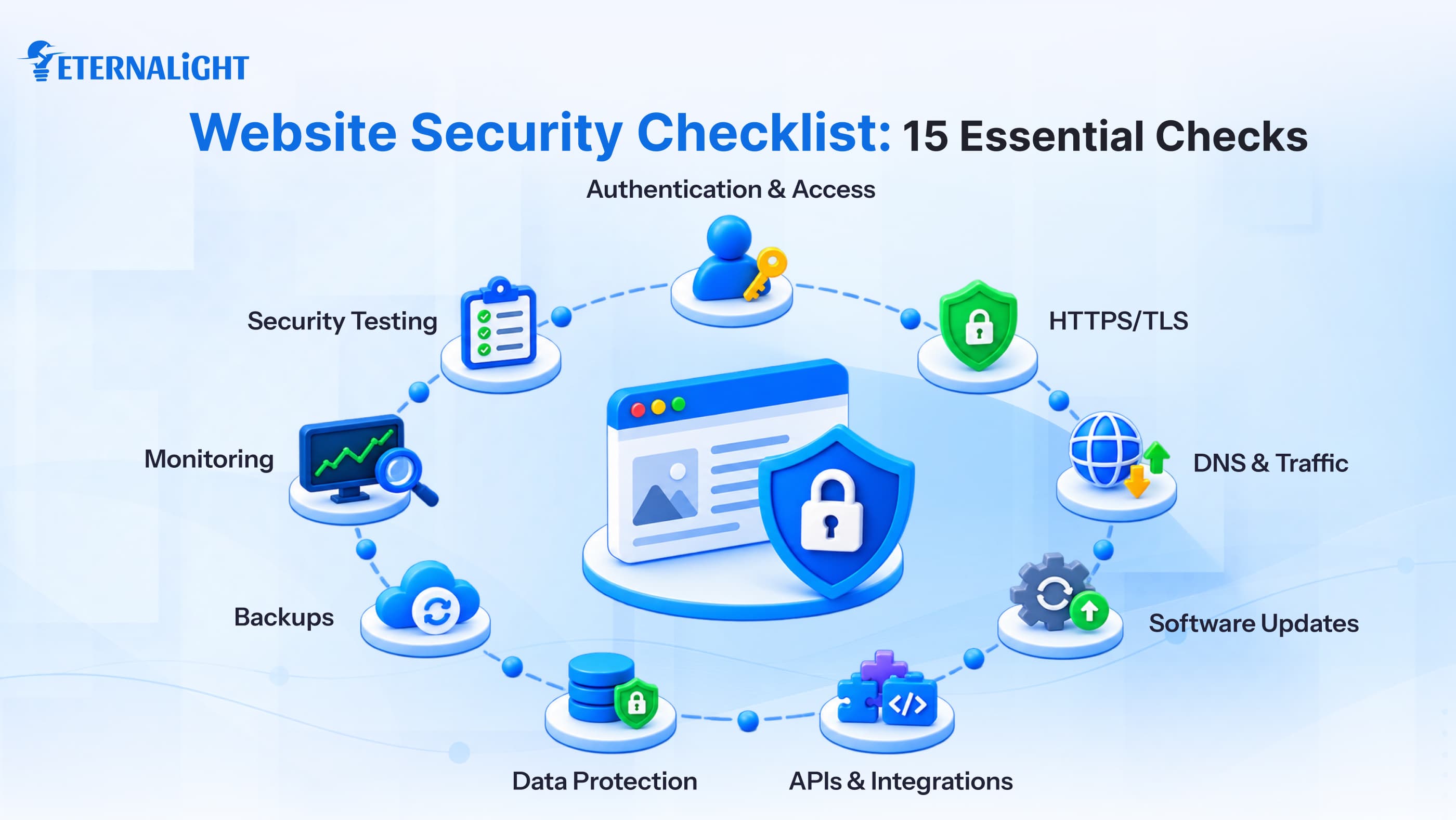
Website Security Checklist: 15 Essential Checks to Audit
Intruders can affect your website in many ways: maybe the library is outdated, an admin account isn't secure, a server isn't configured properly, or an API you access from a local source is no longer safe enough. You wouldn't notice until an exception occurred. When multiple users access a website and it handles heavy daily traffic, especially for financial and other critical business operations, a single lapse can cause a major incident and bring the system down.
To avoid a critical scenario, you don’t need to explore everything, but you must understand the basics of a website tech audit and essential security measures. In this blog, we cover common pitfalls, what needs essential attention, and ways to secure your website with an audit checklist, regardless of the industry.
Confirm Secure Authentication & Authorization
Whenever we access a website, we must provide credentials (username and password), but this alone isn't a strong security measure. Using special characters and a mix of uppercase and lowercase letters strengthens security, but it's not foolproof.
If a company shares credentials with other employees just to access the website, they might misuse them, steal information, or make malicious attempts. Only authorized people should know the password. An intruder or cyber attacker can steal credentials in many ways and use them for phishing, brute-force attacks, and other online threats.
To avoid the risk, organizations should use 2FA and MFA to confirm access.
They can also implement role-based controls, restricting this sensitive information from unauthorized persons and giving authenticated users administrator permissions to make full changes and editing decisions. Secondary users can be limited to read-only permissions. This prevents users from making changes to specific reports or functionality.
Based on the organization's tasks and operations, you can update these permissions; it's best to run a website audit regularly.
Secure Website Traffic with HTTPS/ TLS
Check what your website contains: does it include travel credentials, contact details, or sensitive health or financial information?
Also check whether your website has SSL certification.
Check whether the website URL starts with https or http. Also, if the lock icon is visible and it's not open, the site is encrypted and protected. But we still can’t say 100% that it's secure against all types of attacks.
HTTPS is the standard protocol for data transmission from server to client, and it uses TLS (Transport Layer Security) to create a secure connection between a website and a visitor.
Some services offer paid SSL/TLS certification, while others provide free protection. To manage client-level security and encrypt sensitive information across the web, you must have certification to prevent immediate, unexpected threats.
Notably, this certification has an expiry date, so block your calendar for the renewal date to avoid risk.
Missing the renewal deadline may expose you to threats.
Secure DNS Configuration
A website has a URL that lets visitors access the page and its information, and it also has a unique secure IP address. A URL can open on different systems, but each system has a different IP address. This is only readable by machines; we call it DNS.
If DNS isn't in numeric format, it can be easily decoded and exposed across the web and network; anyone can access sensitive information and breach privacy.
Don’t be reassured by HTTPS and the lock icon in your website URL; they don't protect against web attacks. Use a DNS resolver or DoT that can block malicious data sources and queries, and contact the administrator.
Another alternative is DoH, which makes queries and data invisible, but it can’t prevent the transmission over HTTP or HTTPS. It’s a better option for user privacy.
The DNS system doesn’t have built-in security, so if an attacker floods your DNS system with traffic from unauthorized sources, it can accept the queries, and the system can become vulnerable and unavailable. It is recommended to use a free DNS resolver to encrypt records and queries and identify fake ones.
If you host your email services and web resources in the same place, it can put your system at risk by revealing the exact IP address. If the web server and email address is coming from a common source, an attacker can detect unusual traffic and encroach via DNS records.
Protect Against DDoS Attacks
DDoS attacks happen frequently and can shut down an entire organization for a period; thousands or even lakhs of users may be unable to access services due to malicious intent. So discover the DDoS prevention tools.
Control Excessive Traffic with Rate Limiting
It's better to have an affordable tool that can automatically detect spikes in malicious traffic. If it's a metered connection, then it will be expensive for the website owner.
Make sure the tools protect against all web, network, and application attacks.
Eternalight developers prefer rate limiting to control traffic by setting limits for a time window. They define how long the bot can access the website and how many queries it can make.
Use a Web Application Firewall (WAF)
Do you have a web application firewall to block malicious attempts to flood sensitive queries?
If not, conduct an immediate audit to verify that check whether you’ve subscribed to Cloudflare, AWS WAF, or ModSecurity
If it's updated and the rules meet your security needs.
Keep Your CMS, Frameworks, Plugins & Dependencies Updated
To build a website, developers use CMSs and frameworks to extend capabilities, plus plugins, libraries, and other third-party components and services. It’s a basic principle to prefere the latest version to avoid potential bugs, unexpected technical glitches, or lagging events. Sometimes we have multiple options for plugins, libraries, and components, and we can’t use them all.
Choose relevant dependencies and plugins, review them, and remove any that are outdated or irrelevant duplicates. Before installing any new component, plugin, or theme, take a backup so that, if the newer version isn't responsive, you can switch back.
Validate User Input and Forms
Most websites have a form section to get user feedback, or a login or registration form. You've likely seen the contact form at the end as well, where visitors can send remarks or queries.
It can include multiple fields and a feature to upload any type of file, and the database saves all the details. Before publishing the website, users must check whether all options and functionalities map correctly to inputs and whether the system stores, fetches, retrieves, and updates details properly.
Have you set the required conditions and rules to avoid any unauthenticated access and ensure accurate details?
Review APIs and Third-party Integration
Check how many API integrations and dependencies you use with the website, and which AI tools connect for payment, social media, analytics, and cloud services. Check how long they are needed and when they need to be removed.
Protect Sensitive Business and User Data
Businesses in healthcare, ecommerce, and fintech handle sensitive financial and personal details, so they must keep them hidden from bots and intruders. Whenever you download an app or log in to a site, it may prompt you for different fields/information; be careful before ticking any option. Set two-factor or multi-factor authentication, and biometric access to restrict unauthorized access and prevent data from being automatically stored or transferred.
Handle Secure Backups and Recovery
You may have applied all the key security and data privacy practices, but you still can’t be fully assured; a natural disaster or an outage like Cloudflare or AWS may shut down the system for longer. So keep automatic backups of files, databases, and configuration settings, but confirm they're accessible and retrievable when needed.
Observe Logs and Security Alerts in Real-time
Visitors can’t see what's wrong in the website's backend; they only access it to find information and get answers by exploring relevant services and products. Only the website owner can check whether it's an unauthenticated login or whether the website is experiencing high traffic or failures. It's your responsibility to set alerts for important events and activity before it hits the website with hard errors. If a login attempt fails or major permission changes occur, it can significantly affect the system.
Don’t Forget to Inspect Security Headers
Do you know what security headers are? Have you ever paid attention to them?
Security headers give the browser essential instructions, making the website safer for visitors. But you must configure them properly for your website's needs. They can strengthen the browser-side identity.
Run Regular Security Testing
We have many tools to check technical and non-technical functional weaknesses, but doing it manually takes time. At Eternalight, when we launch any web or mobile app, we usually use Cypress for E2E testing to get a 360-degree view of where the app is struggling, and our team works to fix it. Different websites have different risks; to avoid them, it's essential to test the website's security, review errors and warnings, and address issues before it’s too late.
Review Website Security Regularly
You designed the website, implemented relevant components, plugins, and forms with all the updated versions, took the backup securely, and you think the job is done and sit back and relax. Well, it’s not.
What happens when we cook food and leave it in the kitchen or on the table? Bacteria will affect it. The same is true here: if you don't regularly monitor and revisit your website's technical console to check for vulnerabilities, your website will soon become a target for cyber attackers.
So before publishing the website and even after it’s live, make security audits a habit, set a schedule for regular website security audits, and save the code, infrastructure, and users to be protected.
How to Prioritize Website Security Fixes?
Not all console issues or warnings require immediate attention, but if you don't fix some in time, they can hurt user experience and visibility.
Run a website security audit and review findings that could significantly impact the site.
Classify the issues so the technical team can focus on and fix them at the right time without being hampered.
- If the data is confidential and critical, it can be a target for cyber intruders; it needs to be fixed quickly.
- If any functionality is disrupted or lags, even when users prioritize authentication measures, fix it as a high priority.
- A configuration glitch counts as a medium security gap; you can wait a while, but you still need to fix it.
- Address regular, normal types of findings as low-level.
When Should You Run a Website Security Audit?
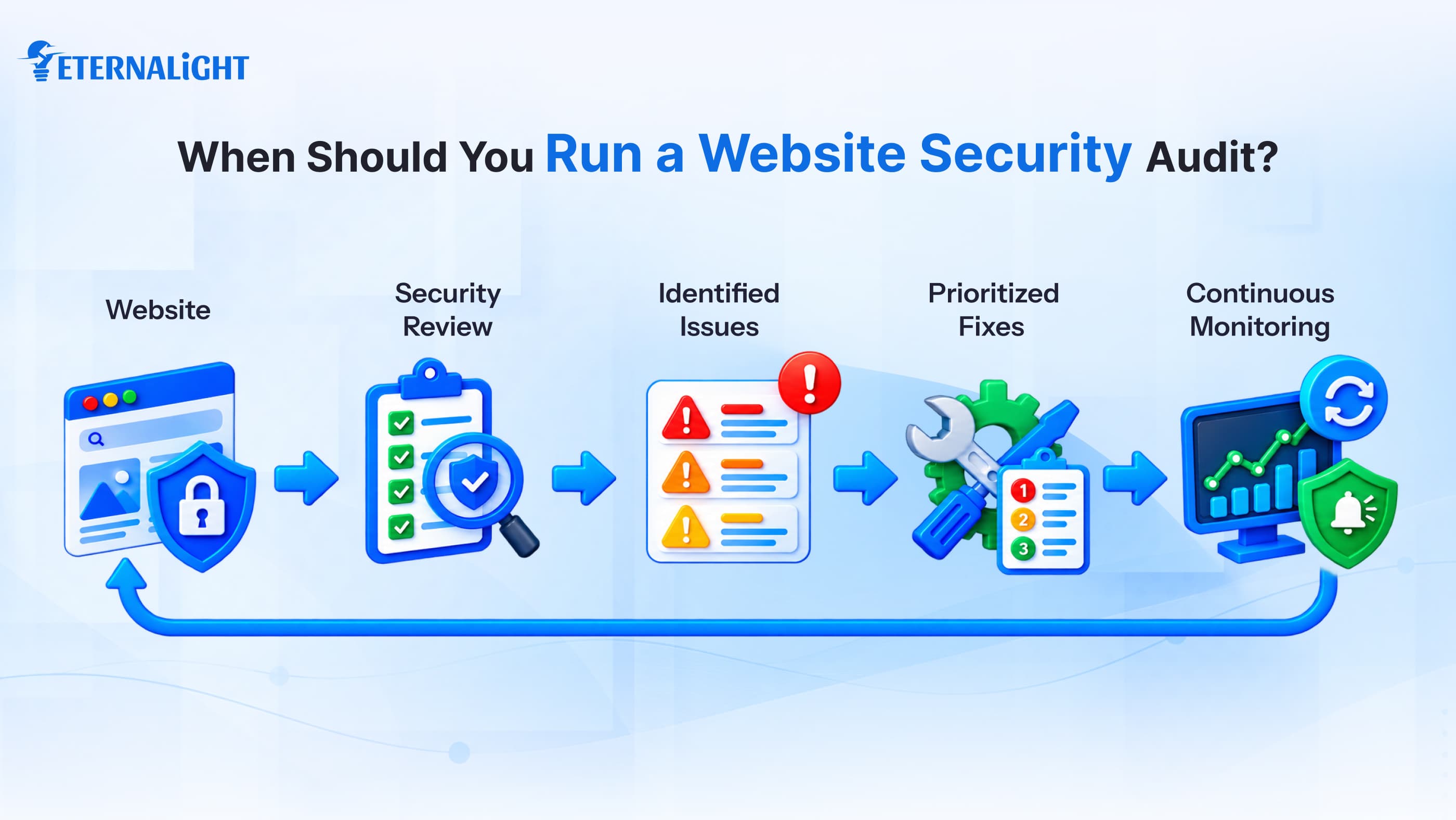
Don’t assume a security audit is only for new websites. Whenever you migrate or modernize a website, or change integration plugins, the site may behave unexpectedly; it's best to review it and run a technical security audit.
- Identify the security gaps when you notice visitors start coming to your website
- If you update the codebase or framework in the backend for any pages or implement new functionality
- Have you noticed a sudden change on the website? Fix it if you implemented new security measures.
- Make it part of regular daily or weekly practice
- If the data involves any financial or personal data, transition it
Final Thoughts
A website security audit isn't a one-time task; run it regularly to protect against security threats as you add features, see more traffic, or update APIs or third-party integrations. So, whenever you make a change or update, audit it to monitor the website’s health. If vulnerabilities or security gaps appear, you can fix them before they lead to serious issues.
Stick to the basics, prioritize warnings and other red flags, and align security measures and compliance to avoid potential cyberattacks and breaches. Users like to visit and explore websites that are secure, fast, and interactive, and deliver the best information at the right moment.

Ayushi Shrivastava
Senior Content Writer
Ayushi is a Content Strategist at Eternalight Infotech with 4 years of experience in transforming complex ideas into clear, engaging, and SEO optimized narratives. She specializes in crafting impactful content strategies that enhance brand visibility and drive meaningful engagement across digital platforms.
Related Blogs
- Software Development7 Mins
From Off Track to Success: Custom Software Development Challenges to Fix Early
Custom software projects don’t always go as planned. Learn which challenges to catch early before they become costly problems for your budget, scope, and product.
- Software Development8 Mins
Product-Market Fit vs Revenue: What Should Indian Startups Chase
Product-market fit vs revenue: What should Indian startups focus on first? Explore the right metrics, customer signals, and growth priorities at each stage.
- Software Development9 Mins
Why Tech Leaders Are Heading Toward Intelligence Engineering in Startups in 2026
See why tech leaders are moving toward intelligence engineering and how it can help startups make smarter AI decisions, reduce waste, and scale