From writing prompts that generate code for an entire feature in any AI-driven app, AI agents can do more. You've probably heard that even developers now use Claude, Cursor, Lovable, and other tools to build an entire website or app; this approach is also called vibe coding.
AI agents can do that too. They can spot abrupt transitions and suggest possible causes, fixes, and code updates. Developers can inspect every element they built and look for assistance. But the problem remains. This is normal because the prompt you gave may not be enough for AI agents to understand. They’re generating responses based only on your written words.
Numerous things can happen.
Maybe the agents don’t understand the instructions about what to discover.
Where should they start?
They don’t know whether they’re finding the bug's trigger point or how to revert the action. They misunderstood the task's end goal.
If someone doesn’t know how to work with agentic AI, it will affect future decisions. Writing a prompt isn’t just typing a few words; it's about using the right structure, because it affects not only the responses but also the overall decision and the project's future scope.
Here’s another article on how to write a prompt for agentic AI systems so they can get clear directions, handle exceptions, and confirm task completion.
Key Elements of an Effective Agentic AI Prompt
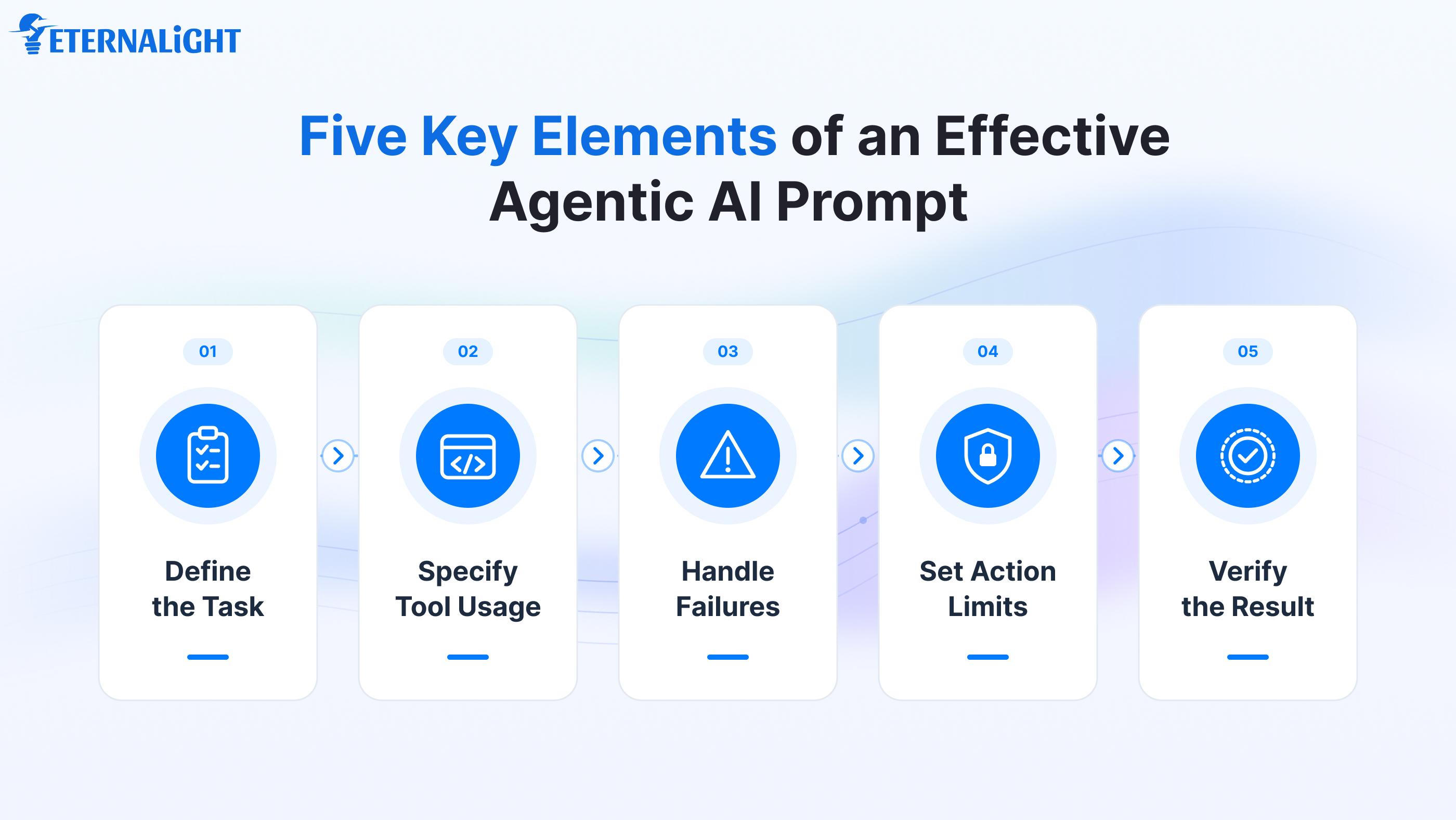
To perform efficiently, an agentic AI system needs a clear plan that identifies the goal, intended and unintended actions, and the entire journey. As AI agents narrow in on the problem, there's no closed door, but there are rules, as well as access to relevant models and tools they must predict and use to verify the path.
1. Define What the Agent Needs to Investigate
Agents are unaware of the situation, context, and issues until you explain them in detail. If a tool stops responding, you can’t command the agent to recover and troubleshoot. The agent must know the core issue, problematic behavior, triggers, patterns, and scenarios where the task can fail. If the task completes, what evidence will be in the final output? You can also set specific rules for agents on what not to access; otherwise, it can impact the workflow.
2. Specify Which Tools the Agent Should Use
An agentic AI system connects to multiple tools to perform a multi-step process: it runs the prompt, accesses files and databases, and explores other connected services. Clearly specify which tool to use and what type of data to generate. While testing the bug, the agent will check the available report and know which access point was denied. Instead of assumptions, the agent has information about the failure point.
3. Tell the Agent What to Do When Something Goes Wrong
Whatever prompt you give may not meet your expectations. You have given the prompt to get the expected result. But you know that every task has a yes-or-no probability. It can succeed or go wrong. The prompt may get stuck midway due to insensitive words, or it may fail because of a third-party integration or an incorrect API call. If any login attempt fails and the user is asked to make the changes again, the agent should identify the error and avoid repeating the same change. If the issue is hard to resolve, the agent must report it.
4. Set Limits on What the Agent Can Change
Boundaries guard us from going beyond the restricted zones. Not all file locations, documents, or actions need to be executed or processed. We can’t let the tools do everything autonomously; some human intervention is required. Specify permission controls and approvals for access, login attempts, and run-quality checks. For example, they can’t edit the data, and a human will also confirm login attempts; this helps avoid potential failures and security risks.
5. Define How the Agent Should Verify the Result
If the agent reaches the last stage and generates a response, the task may not be done as expected. It may seem accurate at first glance, but it doesn’t meet the test-case criteria. Ask the AI agent to respond in a definite format.
To verify whether the agents accomplished the task, look for behavioral indicators, patterns, and triggerable scenarios. If any issues are reported, the agents should state that they need to be fixed before proceeding.
Common Mistakes to Avoid When Writing Agentic AI Prompts
When we write code in a boilerplate or code editor, even concise, correct logic can still throw an error. Even missing a semicolon or quotation marks can change the output. Likewise, agentic AI systems can go wrong because of poor prompt writing. Some of them are mentioned below:
Giving Conflicting Instructions
There's no need to explain everything explicitly in a long paragraph. Going broad may break the flow and create the conflict. They might not understand the scope of what they need to do, the actual steps to follow, or which function to perform.
Allowing Unlimited Attempts
If agents keep performing the task without knowing when to stop, the loop continues. Sometimes they keep responding with the same output repeatedly. Set a limit on how many times the AI agent can attempt to accomplish the goal to avoid ambiguity.
Leaving the Final Output Undefined
If we define the output structure too strictly, it may miss important information because text can’t always explain things clearly; we need visuals or a specific schema with defined field types.
Relying on Instructions Alone for Safety
Don’t stop at instructions; define test-case scenarios and validation rules before giving final results. Define that the agent can’t make changes to files or data outside the defined scope. Also, it can’t call unnecessary tools not required for the process, or take actions that differentiate between failed and successful schemas.
Improper Tool Assistance
If the AI agent doesn't know a specific tool model, it may become redundant and forget to call and access it when needed.
Wrap Up
Agentic AI systems are widely adopted for complex, multi-step reasoning workflows. They can find, fix, and function autonomously, and identify failures. But agents need clear instructions or prompts; four properties should justify them: clearly define all file actions, scope, and stop conditions to avoid unpredictable events.
The instructions should clearly define how to handle failures, exceptions, and errors, and validate scenarios that accomplish the goals. Permission access control should be bounded and defined differently for humans and agents: what they’re allowed and disallowed to do.
When you write prompts for an agentic AI system this way, you can seamlessly review and control the workflow.

Ayushi Shrivastava
Senior Content Writer
Ayushi is a Content Strategist at Eternalight Infotech with 4 years of experience in transforming complex ideas into clear, engaging, and SEO optimized narratives. She specializes in crafting impactful content strategies that enhance brand visibility and drive meaningful engagement across digital platforms.
Related Blogs
- AI & ML10 Mins
Leading AI Development Companies in the USA for 2026
Searching for an AI development company in the USA? Discover 10 companies offering AI development, GenAI, AI integration, and custom solutions.
- AI & ML8 Mins
Context Engineering vs. Prompt Engineering: How They Work in AI Applications
Understand context engineering vs. prompt engineering, how they differ, and how context helps AI applications deliver more relevant and reliable responses.
- AI & ML7 Mins
Agentic AI vs RPA: Key Differences and Which to Use When
Compare Agentic AI vs RPA, explore their key differences, real-world use cases, and learn when to use each for business process automation.