The integration of voice technology is revolutionizing the methods in which individuals use their digital applications. With voice assistants, automated virtual assistants, accessibility applications, and digital learning programs, it has become inevitable for individuals to integrate voice technology into their experience. The need for intelligent voice technologies is growing rapidly as companies look to provide an interactive and personalized experience to their customers.
Text-to-Speech API enables applications to transform written text into audio using artificial intelligence and natural language processing technology. It uses real people's voices instead of robotic and unnatural computer voices.
There are many AI voice providers that offer a text-to-speech service. However, the most popular among all of them is the ElevenLabs text-to-speech API due to its natural voice sound, voice customization abilities, multilingualism, and low latency. Developers don't have to create voice models from scratch to use them, as ElevenLabs provides ready voice samples.
Many developers prefer to compare a text-to-speech API with a speech-to-text API because both of them are frequently used together. The speech-to-text technology transforms voice into text, while the other API converts text into voice.
This guide will tell you everything you should know about using ElevenLabs text-to-speech API in your applications.
What is Text-to-Speech API?
Text-to-Speech API is a programming interface used to convert text data into speech using artificial intelligence methods.
It consists of the following stages:
Text Input -> Language Analysis -> Voice Generation -> Audio Output
First, the text input is analyzed and structured based on the sentence structure, punctuation marks, and pronunciation. After that, NLP algorithms define the context and pronunciation of words. At last, audio data is synthesized.
Applications of Text-to-Speech API include the following:
- Voice Assistants
- Navigation Systems
- E-Learning Platforms
- Accessibility Tools
- Audiobooks
- Customer Support Applications
- AI Chatbots
Text-to-Speech API vs Speech-to-Text API
Many developers are usually confused about the difference between the Text-to-Speech API and the Speech-to-text API. However, their functions are opposite.
Feature | Text-to-Speech API | Speech to Text API |
Input | Text | Voice |
Output | Audio | Text |
Purpose | Voice generation | Voice recognition |
Example | AI assistant replies | Voice search |
Both technologies can work together to create an interactive conversational system.
Why Choose the ElevenLabs Text-to-Speech API?
There are several AI text-to-speech software available now; however, the majority of programmers choose ElevenLabs' text-to-speech API because of its strong focus on natural and realistic voices.
Human-Like Voice Quality
Old-fashioned speech applications have a robotic and artificial sound. This application makes use of sophisticated AI models and provides a human-like sound.
Low-Latency Performance
Applications such as voice assistants and customer support applications need instant replies. The feature of instant speech generation is available in ElevenLabs.
Voice Customization
The voice settings that can be customized include the following:
- Stability
- Style
- Speaking speed
- Voice properties
This allows companies to provide their clients with an individual voice experience.
Voice Cloning Capabilities
One of the most interesting features of the ElevenLabs text-to-speech API is voice cloning. Companies are able to clone their unique voice model.
Multiple Language Support
For global applications, compatibility with multiple languages may become necessary. This tool makes it possible for programmers to implement multi-language voice experience with ElevenLabs.
Streaming Support
To make the API useful in situations such as:
- Live AI Assistants
- Virtual Agents
- Chatbots
- Customer Service Applications
Developer-Friendly Integration
The API architecture is quite straightforward, allowing for integration with:
React, Node.js, Flutter, Android, iOS, React Native
Prerequisites Before Integration
Before implementing the Text-to-Speech API, developers should prepare their environment.
Create an ElevenLabs Account
Visit the ElevenLabs platform and create a developer account.
Generate API Credentials
After registration, generate an API key from the dashboard.
Choose a Voice
Select the voice model that fits your application’s requirements.
Set Up Your Development Environment
Choose your preferred technology stack:
Node.js, React, React Native, Flutter, Android, iOS
Configure Environment Variables
Avoid storing API keys directly inside code.
Example-
ELVENLABS_API_KEY=YourAPIKey
Install Dependencies
Example-
npm install axios dotenv
Having these prerequisites ready simplifies the integration process.
Step-by-Step Guide to Integrate ElevenLabs Text-to-Speech API
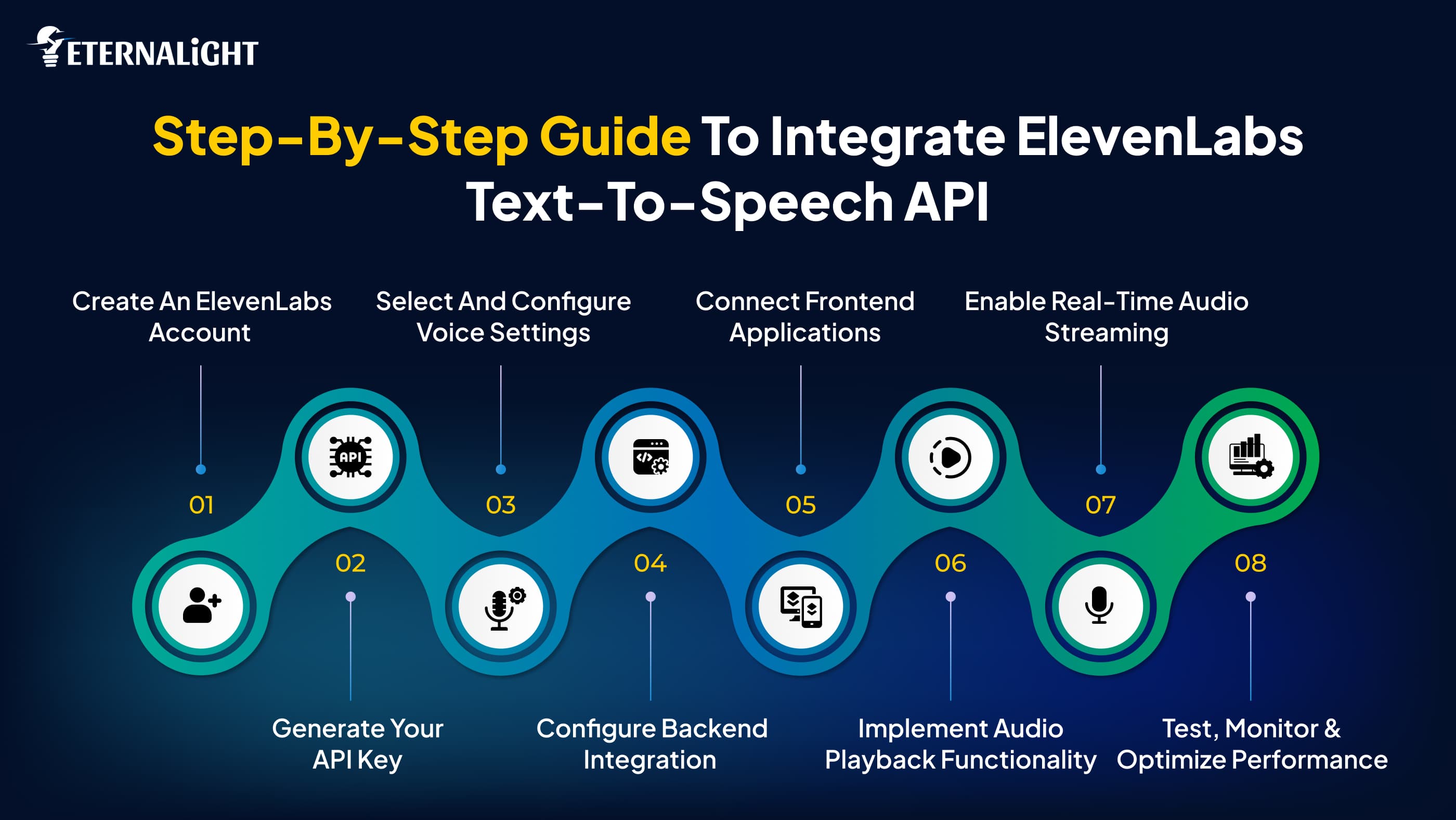
The integration of the ElevenLabs text-to-speech API into web and mobile applications is a simple task if done correctly. Each process, from creating an account to playing audio to a real-time audio stream, is essential in making a smooth experience of the voice service for the user.
Step 1: Create an ElevenLabs Account
The first process involves signing up for the ElevenLabs website and accessing the developer dashboard. Signing up to this site gives you access to voice models, API documentation, and usage stats.
Post sign-up:
- Access to the ElevenLabs developer dashboard
- API section of the website
- Voice model selection
- Account usage limits and plans
It is important to have an account since all other API requests will be authorized from there.
Step 2: Generate Your API Key
The API key is a means of authenticating that gives you the ability to communicate with ElevenLabs through your application.
To create your API key:
- Log in to the dashboard
- Go to Profile Settings
- Find API Key
- Create a new API key
- Copy the API key and keep it safe
Note for security:
- Avoid storing your API keys in frontend code
- Use environment variables to store credentials
- Limit API key access to trusted systems only
Example:
ELEVENLABS_API_KEY=YourSecretAPIKey
Environment variables increase the security of your applications.
Step 3: Select and Configure Voice Settings
Choose your voice settings before sending any requests.
Several voice models are available at ElevenLabs, along with customizable options such as:
- Stability
- Similarity boost
- Speaking style
- Voice speed
- Language preference
Customizing voices allows developers to develop unique experiences.
Examples:
- Calmer and clearer voices can be used for educational applications
- Conversational voices may be needed for chatbots
- Expressive voices are good for audiobook applications
Selecting the right settings has a big impact on results.
Step 4: Configure Backend Integration
A backend server is a secure way of communicating with the Text-to-Speech API service. Communicating via the frontend can result in exposing the API keys.
The common responsibilities of a backend include:
- Receiving text data as input
- Authenticating API calls
- Sending requests to ElevenLabs
- Processing audio output
- Returning the output to the client
An example using Node.js is provided below:
const axios = require("axios");

async function generateSpeech() {
  const response = await axios.post(
    "https://api.elevenlabs.io/v1/text-to-speech/VOICE_ID",
    {
      text: "Hello and welcome to our application",
    },
    {
      headers: {
        "xi-api-key": process.env.ELEVENLABS_API_KEY,
        "Content-Type": "application/json",
      },
      responseType: "arraybuffer",
    }
  );

  return response.data;
}
Step 5: Connect Frontend Applications
After having developed the backend services, it is now time to connect the frontend application to generate speech.
The frontend needs to be able to:
- Take text input from the users
- Make API calls to the backend services
- Show loader
- Get back the generated audio
- Play the audio automatically
Some of the tools to use for web applications are React, Angular, and Vue.
Tools that could be used for mobile apps include: Flutter, React Native, Android, and iOS.
It enhances user experience.
Step 6: Implement Audio Playback Functionality
After receiving generated audio from the API, applications must play the audio output for users.
For web applications:
<audio controls>

<source
src=”generatedAudio.mp3”>

</audio>
For mobile applications:
Audio controls should include: Play, Pause, Replay, Volume control
Providing playback controls enhances the interactive experience.
Step 7: Enable Real-Time Audio Streaming
Streaming in real-time is especially relevant for those applications that need instant reactions.
Streaming minimizes delays as audio data begins to play even before the whole answer is received.
Typical scenarios are:
- AI-based chatbots
- Voice assistants
- Online customer support
- Conversational AI agents
Advantages of streaming:
- Less latency
- Faster responses
- Improved conversation flow
- Enhanced user engagement
The ability to stream becomes more and more relevant in AI-based solutions.
Step 8: Test, Monitor, and Optimize Performance
Once the process of integration is complete, do the testing and optimization before deploying.
The developer needs to test:
- Sound quality
- Responsiveness
- Various voice modes
- Networking
- Error handling
- Mobility responsiveness
Performance optimization includes:
- Caching frequently generated sounds
- Compressing sound files
- Eliminating unnecessary API calls
- Watching the API usage
Testing will ensure the consistent performance of the system.
Security Best Practices for Text-to-Speech API Integration
Security plays an important role during the incorporation of APIs from outside sources.
Never Expose API Keys
Do not keep the API keys hard-coded into frontend applications.
Incorrect:
const key = “12345”;
Correct:
API_KEY = 12345
Backend Proxy Approach
All the requests need to go through backend services.
Use HTTPS
HTTPS avoids any data theft.
Implement Rate Limiting
Rate limiting helps in avoiding misuse of the API.
Include Request Validation
Requests must be validated before being handled.
Common Use Cases of ElevenLabs Text-to-Speech API
The ElevenLabs text-to-speech API can be integrated across multiple industries to deliver engaging, accessible, and interactive user experiences. Its realistic AI-generated voices enable businesses to improve communication while making digital platforms more user-friendly and efficient.
AI Chatbots
AI assistants use voice responses for better interaction.
E-learning Platforms
Educational applications convert text lessons into audio.
Audiobooks
Publishers use Text-to-Speech APIs for narration.
Accessibility Applications
Visually impaired users can consume content more easily.
Customer Support Systems
Voice-enabled support systems improve customer experiences.
Healthcare Applications
Healthcare apps provide medication reminders and voice assistance.
Content Creation
Creators use AI-generated voiceovers for podcasts and videos.
Challenges Developers Face During Integration
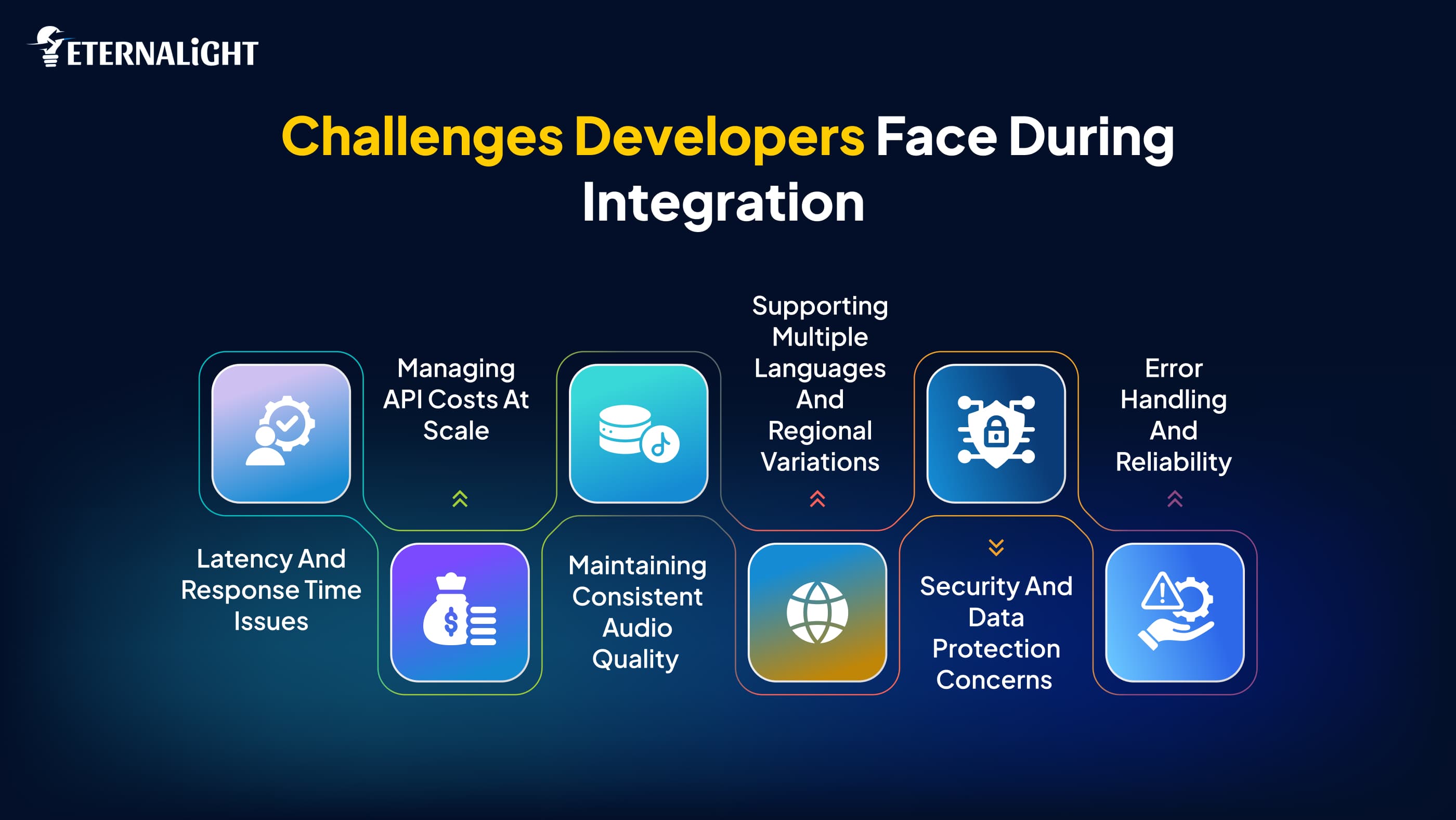
Even though using the Text-to-Speech API comes with several benefits for users and developers, there are also challenges associated with its integration into apps. Learning about those challenges will help you build more efficient applications from the very beginning of your work.
Latency and Response Time Issues
Latency issues are quite common for developers who implement voice generation. Applications like AI assistants, customer support platforms, and conversational chatbots need to react fast and deliver a response right away since any delays can disrupt the conversation flow.
However, the response time may depend on different factors such as network conditions, request size, server processing speed, and the number of API requests that the application processes at the same time. To reduce the delay, developers try to optimize backend systems and use streaming possibilities that enable starting audio playback before the full response generation.
Managing API Costs at Scale
As applications scale and gain more users, the number of API requests becomes higher. Those applications that create frequent voice responses, like audiobook services or assistants, may face growing operating expenses.
It is important for developers to control API costs and use techniques that can lower the number of unnecessary requests. Techniques such as caching the already created audio responses and proper management of requests can help to be cost-efficient while not losing user experience.
Maintaining Consistent Audio Quality
The next problem related to using AI is keeping the quality of voice consistent in all situations. The speech produced by AI can be inconsistent because of the differences in text structure, pronunciation difficulty, or voice settings chosen by developers.
Specific words, abbreviations, technical terminology, or unusual names may sometimes fail to be pronounced properly. Therefore, developers spend extra time experimenting with voice settings and testing text input.
Supporting Multiple Languages and Regional Variations
Applications nowadays are increasingly aimed at global audiences, so there is a need for multiple language support. Although it is an opportunity that can increase applicability, it may bring about extra difficulties.
Each language features distinct pronunciations, speech patterns, and accents. Regional peculiarities may influence the quality of voice generation. Thus, developers have to do a lot of testing in order to make sure the speech sounds natural.
Security and Data Protection Concerns
Another important aspect when it comes to the use of APIs is security. Indeed, the application interacts with external services by means of authentication credentials.
Thus, developers usually face the problem of the exposure of such credentials since storing them in frontend applications allows users to obtain them. This problem is solved by passing through backend services.
Error Handling and Reliability
External APIs are prone to fail from time to time because of network-related problems, rate limitations, and occasional disruptions of services. This is the reason why appropriate error handling becomes critical in order to avoid any negative influence on the application and its performance.
The implementation of monitoring and alternative solutions enables applications to operate properly despite failures.
Future of AI Voice Technology
AI will continue to redefine the ways digital communications occur, and future advancements in voice technology are expected to be much more sophisticated compared to just voice synthesis.
Personalized AI Voices
Companies will start paying greater attention to the creation of unique digital experiences, and therefore, personalized AI voices might become an integral element of brand experience. Companies can create specific voice models that would correspond to their communicative styles.
Voice Systems Aware of Emotional Context
In the future, AI voice systems might become aware of the context of communication and respond appropriately, rather than provide neutral replies. Depending on the situation, AI might generate an encouraging, friendly, or conversational voice.
Real-Time Communication in Multiple Languages
Language barrier remains one of the main obstacles for successful communication in a global world. In the future, it may become possible because AI will translate from one language to another in real time and provide natural-sounding speech.
Advanced Conversational Assistants
Future AI voice assistants will become smarter and more context-aware, allowing them to process conversation history and user preferences.
Improved Accessibility and Immersive Experiences
AI voice technology is likely to have great importance in terms of accessibility and next-generation technologies. Future use of the technology could offer more advanced voice assistance services to users, along with integration with technologies such as smart devices, AR, and VR.
Conclusion
Voice technology is revolutionizing the interaction of users with applications. The inclusion of a Text-to-Speech API can help developers create an engaging, accessible, and interactive experience on web and mobile platforms.
The ElevenLabs text-to-speech API comes with real voice quality, customizability features, multi-language options, and integration scalability.
With the addition of other technologies such as a speech-to-text API, developers can develop an end-to-end conversational experience for AI assistants and intelligent applications.

Kusum Sethiya
Software Engineer
Kusum Sethiya is a Software Engineer at Eternalight Infotech, focused on building clean and intuitive. She enjoys turning ideas into reliable applications using modern technologies like Javascript, React, Node.js , and MongoDB.
Frequently Asked Questions
A Text-to-Speech API converts written text into spoken audio using AI technology.
ElevenLabs uses AI models to generate realistic voice output from text input.
Speech-to-text API converts audio into text, while Text-to-Speech API converts text into audio.
Yes, it can be integrated with Android, iOS, Flutter, and React Native applications.
Yes, it supports low-latency voice generation and streaming.
Related Blogs
- Software Development11 Mins
Website Security Checklist: What to Check Before It's Too Late
Worried about website security? Use this practical website security checklist to spot common risks and protect your website, data, and users.
- Software Development7 Mins
From Off Track to Success: Custom Software Development Challenges to Fix Early
Custom software projects don’t always go as planned. Learn which challenges to catch early before they become costly problems for your budget, scope, and product.
- Software Development8 Mins
Product-Market Fit vs Revenue: What Should Indian Startups Chase
Product-market fit vs revenue: What should Indian startups focus on first? Explore the right metrics, customer signals, and growth priorities at each stage.