AI tools for software development used to be limited to autocomplete suggestions and simple tasks. That is not the case anymore.
In 2026, software teams regularly use AI tools for developers across their entire workflow. From writing code to helping with testing, production, deployment and documentation, AI has come a long way from where it began. Software development is one of the fields that has seen the most impact and use of AI since its inception.
For startups, this matters more than it does for large enterprises. You have a smaller team and faster release cycles. You are competing against businesses with bigger engineering budgets. It’s important to use whatever resources available to your benefit.
This guide covers the AI tools for software development that startups are using in 2026, their use cases and their benefits.
Why AI Matters for Software Development for Startups
An easy answer to the question of ‘Why AI matters for software development?’ would be Speed. But there’s a lot of reasons why using AI for your development process is useful other than the most obvious benefit of speed.
AI coding assistants now generate 46% of all code written on GitHub. By the end of 2026, this number is projected to shoot up to 60%. More than half the code written on GitHub would be generated by AI coding assistants.
AI tools like Github Copilot improve developer productivity by up to 94%. These numbers give concrete proof of how AI is integrating itself in the software development industry.
AI native startups reach revenue milestones faster than their traditional counterparts.
Companies providing AI development services are also taking advantage of the AI boom and helping small businesses and startups scale with the help of AI.
Top AI Tools for Software Development Used by Startups in 2026
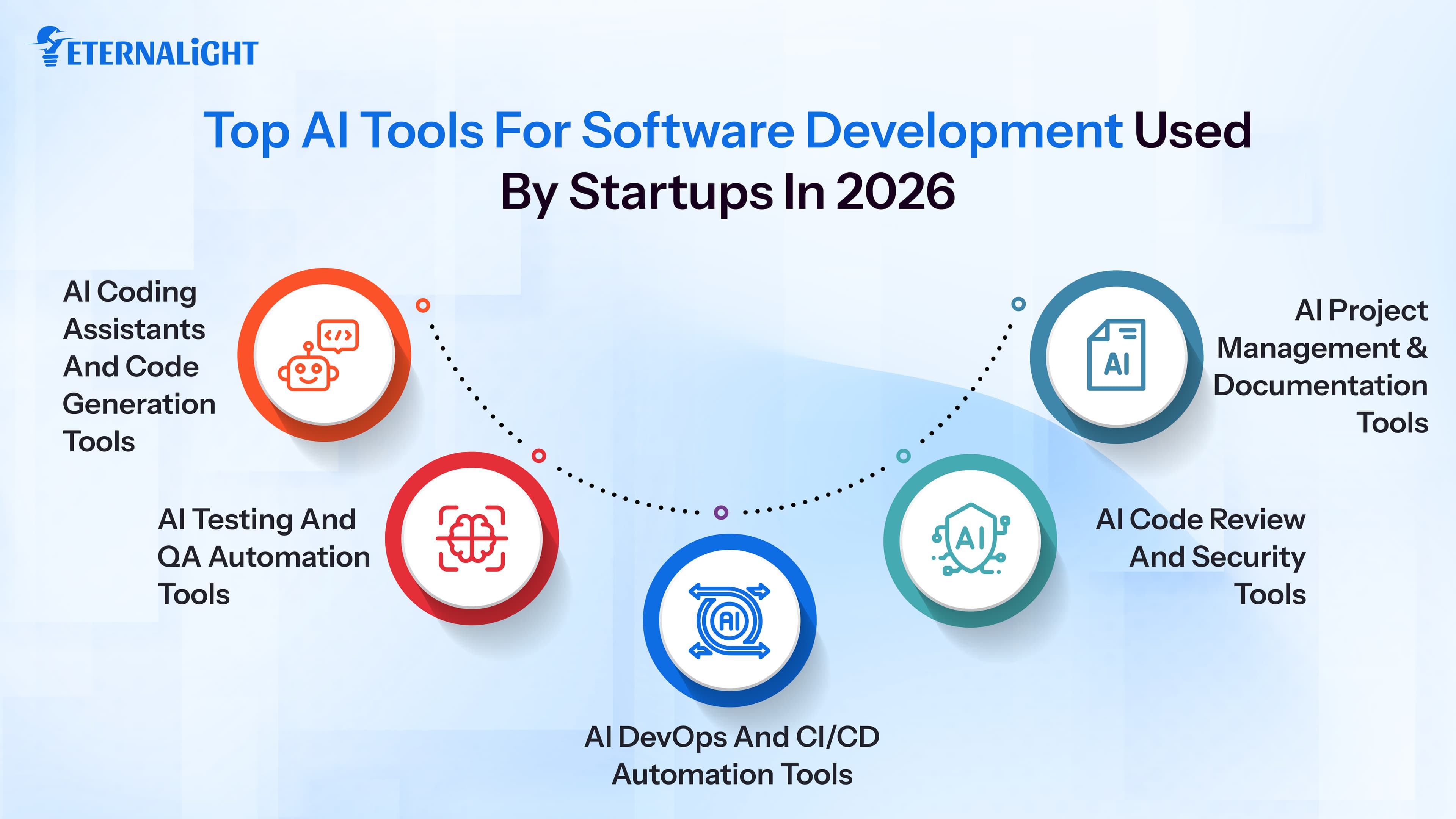
These are the tools that software development companies and startups are using in 2026.
AI Coding Assistants and Code Generation Tools
This is where AI has had the most impact, especially in code generation, which remains one of the most widely used applications of generative AI tools.
Modern software teams are also extending AI beyond code generation into data processing and extraction workflows, using scalable document parsing solutions to handle large volumes of unstructured business data more efficiently.
Claude Code
Claude Code launched in May 2025. Within months, it became the most widely used AI coding tool for software development among small startups. By February 2026, the Pragmatic Engineer Survey found 75% adoption at startups with fewer than 10 engineers. There is no other AI coding tool that has come that close to Claude’s adoption at the startup scale.
What makes it stand out is its context window. You can feed it an entire codebase in a single prompt and it would be able to find bugs across multiple files, plan architecture or make changes from scratch. Most tools operate at the file level. For a developer this presents a great advantage and saves precious time.
It also generates technical documentation, checks compliance logic, and handles multi-file code generation without making you switch between tools. If you are thinking about embedding AI into your product itself, our article on building applications with AI agents covers how startups are doing exactly that.
GitHub Copilot
Copilot is the dominant tool by enterprise headcount. Copilot works differently from Claude Code. It works inside your editor, watches what you are writing, and offers real time suggestions as you type. It recognizes patterns in the file you have open and predicts what should come next. If you write a comment describing what a function should do, it will attempt the implementation.
For startups already using VS Code, it becomes the simplest starting point. It completes repetitive patterns, writes boilerplate, and suggests functions in real time. The setup barely takes any time and this tool is great with everyday repetitive work.
Cursor
Cursor is a code editor built on VS Code that understands your full project directory rather than just your current working file.
This is a very important feature. When you need to refactor a component that is referenced across eight files, Cursor can trace every usage, understand the dependencies, and make changes without causing errors or bugs in your codebase. When you ask Cursor a question about your codebase, it gives you accurate answers based on the entire directory. Many teams run Cursor alongside Claude Code. Cursor handles the editor level work while Claude Code handles the larger reasoning tasks.
AI Testing and QA Automation Tools
Manual QA does not scale with a small team. Every startup discovers this at some point. AI testing and QA automation tools can help you scale faster.
Testim
Testim uses machine learning to write, maintain, and run UI tests. It identifies elements based on behavior instead of label names.
For startups that are looking to increase shipping times, this is a practical choice. It focuses on a problem that traditional test automation has never solved well. Every time your UI changes, your automated tests break. Someone has to go find the broken selectors, update the scripts, and re-run all the tests.
Testim uses machine learning to identify UI elements based on how they behave. When a button changes its name or moves on screen, Testim figures out it is still the same element. Your tests keep running without someone needing to fix them after every sprint. It helps save time and increases efficiency.
Mabl
Mabl is an end to end testing platform that learns your application as it evolves. It runs automated regression tests, detects visual issues, and integrates directly into your CI/CD pipeline.
Mabl takes a broader approach than Testim. When you deploy a new build, Mabl runs a full suite of tests automatically. If something breaks, it flags it before users encounter it. As your product evolves, so does Mabl. It adjusts its understanding of what normal looks like so it does not produce false alarms as new features get added.
It works particularly well for teams without a dedicated QA engineer. You get coverage without needing an expert or specialist to own and maintain the test suite.
Applitools
Applitools solves a problem that most functional tests miss: visual regression. It uses AI to compare screenshots across browsers, screen sizes, and operating systems to catch rendering issues that might go undetected with simple code tests.
Cross browser rendering bugs are invisible until a user hits them. Applitools searches for such bugs and surfaces them before release.
You can have tests that confirm a button exists and does what it should. But those tests will not tell you if the button renders on top of another element in Firefox, or if a font change made your form unreadable on mobile. This is what Applitools is best at.
AI DevOps and CI/CD Automation Tools
The present market rewards faster shipping time. These are the best AI tools for startups that help make the pipeline between writing and deploying become a lot more efficient.
GitHub Actions with AI Integrations
GitHub Actions has become a standard CI/CD framework. In 2026, teams layer AI into their Actions workflows to autogenerate pipeline configurations, surface build failures, and identify optimization opportunities. Nowadays, a single DevOps engineer, paired with the right AI integrations, can manage infrastructure that would normally have required a full platform team. Github Actions when integrated with AI can help make your deployment process a smooth sailing journey.
As AI agents rise and take on more of this operational work, the scope of what small teams can ship keeps expanding.
Harness
Harness is used to automate the full software delivery lifecycle. It handles CI/CD, feature flags, cloud cost management, and deployment verification in one platform. It has an AI module that predicts what kind of build failures might happen and automatically rolls back failed deployments.
For startups that are running on AWS or GCP, Harness also identifies cloud spending waste by analyzing usage patterns. It saves you both time and money.
Opsera
Opsera connects your existing tools (GitHub, Jenkins, Jira, AWS) and gives you visibility into your entire pipeline. The AI layer identifies bottlenecks and recommends process improvements based on your delivery data. Small teams often do not know where they are losing time in the pipeline. Opsera helps to identify that.
AI Code Review and Security Tools
Moving fast creates security debt faster too. These AI tools for developers help them catch vulnerabilities and tighten security.
Snyk
Snyk scans your code, containers, and open source dependencies for vulnerabilities in real time. It integrates directly into your IDE and CI/CD pipeline. Developers see security issues while writing code. Over 2,500 organizations currently use Snyk. For startups handling user data or building in regulated industries, this is an affordable first step toward a solid security posture. Security is an important step of development that must not be overlooked, and will cause severe issues if vulnerabilities go unnoticed.
DeepCode is another such tool that is now part of Snyk itself. It uses AI trained on millions of open source code changes to find bugs and security vulnerabilities that rule-based scanners might miss. It understands code intent and can catch logic errors and data flow issues that traditional static analysis tools overlook.
CodeClimate
CodeClimate tracks code quality over time and finds technical debt in your project. Every pull request gets scored based on complexity, duplication, and test coverage. Over weeks and months, you see whether your codebase is getting healthier or accumulating problems that will slow down work in the future. Technical debt is usually invisible until it slows everything down and causes problems. It is one of the biggest reasons for failed projects. CodeClimate makes the cost visible early.
AI Project Management and Documentation Tools
Documentation, sprint planning, and keeping everyone aligned take a lot of time and resources. These are some of the best AI tools for developers that reduce that overhead.
Linear with AI
Linear is a project management tool built for engineering teams. In 2026, its AI features automatically triage issues, suggest priorities, and write issue descriptions from rough notes. It connects directly to GitHub commits and pull requests. That means project tracking stays current without needing manual updates. For product managers who are working with small engineering teams, this is an incredibly helpful tool. Having AI embedded into it has increased its usability and made it more efficient than ever before.
Notion AI
Notion AI handles sprint documentation, product specs, onboarding guides, and internal wikis. If you feed it meeting notes, it will produce a structured summary with action items. Describe a feature in plain language and it drafts the product specifications. It does not replace your product manager however it does handle the parts of the job that consume too much time and produce the least differentiated work.
DocuWriter AI
DocuWriter automates technical documentation directly from your codebase. It reads your code and generates API documentation, README files, and inline comments. For startups with engineers that don’t have time to document everything or avoid writing it, this becomes a saviour. Good documentation is extremely important and critical to have. This comes in handy especially when you start onboarding new engineers or bring in external partners. DocuWriter produces documentation without burning hours over it and saving you time.
Conclusion
The startups that are building the best products in 2026 are not the ones with the most engineers or the biggest teams. They are the ones that have embraced AI tools for software development and embedded them into their systems.
For your startup, you do not need to adopt every tool on this list. You can pick and choose based on your needs If code review is slowing you down, you could start with Snyk. If QA is the problem, start with Mabl.
AI tools for developers have already cushioned themselves well in software development. The startups that use them well ship more, spend less, and compete smartly. Using the AI boom to your advantage gives you and your product an edge that other startups without AI won’t have. You save time, money, energy and resources.
Enterprises and startups are now choosing to build custom software and either embedding AI into their systems or building AI native softwares from day one. This just goes on to show how artificial intelligence has become integral to software development and how important it is to integrate into your software too.
If you have a startup and your team wants to build smarter and ship faster, our team can help you choose the right AI tools and work alongside you to come up with great solutions.

Gauri Pandey
Technical Content Writer
Gauri Pandey is a Technical Content Writer at Eternalight Infotech. She uses her expertise to break down complex topics into simple, value-driven narratives, bridging the gap between technology and real-world applications.
Frequently Asked Questions
Claude Code, GitHub Copilot, and Cursor are the best for code generation. Mabl and Testim are the best choices for testing. Snyk is the standard for security scanning.
Mabl and Testim are the most common choices. Both handle automated testing and test maintenance without requiring a dedicated QA team. Applitools is the go to for visual regression testing.
Tools like Snyk and DeepCode scan code in real time for vulnerabilities including logic errors and insecure dependencies. They work inside your IDE and CI/CD pipeline so issues get caught during development, not after deployment.
Linear with AI is built specifically for engineering teams and integrates directly with GitHub. Notion AI is great for documentation and product specs. Many startups use both of these tools together.
Yes. Notion AI and Linear require no technical background. For product development, platforms like Cursor and Claude Code are increasingly used by non engineers to prototype ideas with minimal code.
Related Blogs
- AI & ML10 Mins
How to Test Generative AI Applications: A Practical Guide to Reliable AI Systems
Learn how to test generative AI applications for accuracy, hallucinations, performance, security, RAG workflows, and reliability.
- AI & ML10 Mins
AI Data Security Strategies: 8 Ways to Protect Data in AI Systems
Explore 8 AI data security strategies to protect sensitive data across prompts, AI models, RAG systems, APIs, access controls, storage, and outputs.
 AI & ML17 Mins
AI-Ready Data Architecture: A Complete Guide for Modern AI
Learn how AI-ready data architecture works, its key components, framework, how to build it, and how it supports generative AI, machine learning, and AI agents.